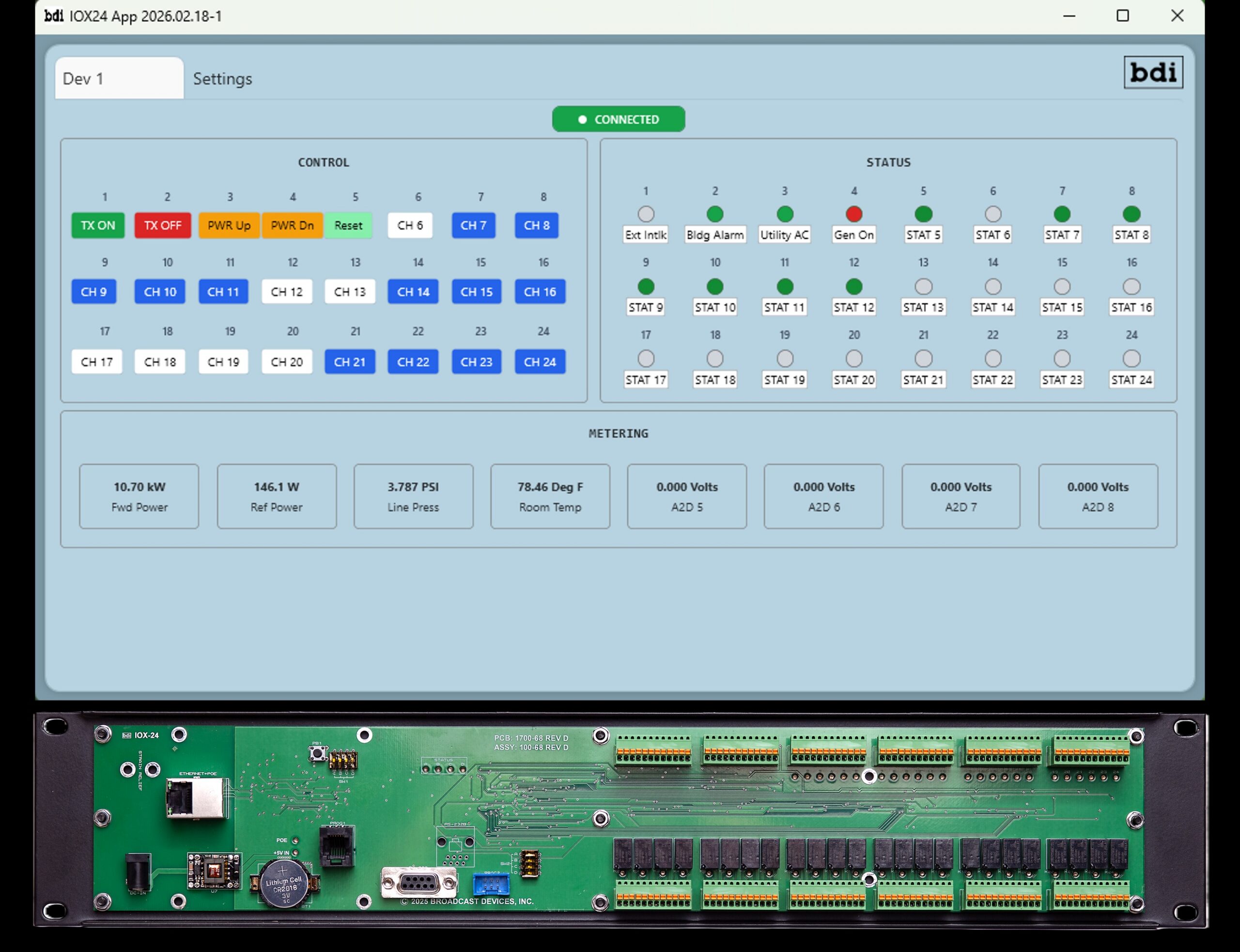
Broadcast Devices Inc. will introduce the IOX-24S SNMP Remote Control and Channel Expander at the NAB Show.
It describes this as a flexible I/O platform to simplify remote monitoring and control in broadcast transmission and studio environments.
“The IOX-24S can operate either as a standalone SNMP remote control system or as a channel expansion panel for any SNMP-compatible remote control platform,” it said.
“This dual-purpose design allows broadcasters to deploy the IOX-24S as a primary control solution for smaller facilities or use it to add control, status and analog metering capacity to existing remote control systems without replacing installed infrastructure.”
In a single rack-mount chassis, the IOX-24S provides 24 Form C control relays, 24 status inputs and eight analog inputs to support a range of broadcast control and monitoring applications.
“The unit operates as an SNMPv2 agent and is supplied with an SNMP MIB, enabling straightforward integration with modern network-based remote control and monitoring systems.”
For local operation, BDI supplies a Windows-based graphical user interface that allows control and status monitoring over standard IP networks.
The IOX-24S supports power from standard AC mains or Power over Ethernet (PoE). The Windows application can manage multiple IOX-24S panels simultaneously; BDI says this makes it practical for distributed facilities with multiple transmitter or studio locations.
The IOX-24S is plug-and-play compatible with BDI SWP-200 Series switch controllers and SWP-300 remote control products via a serial connection, expanding their available control, status, and metering channels.
Typical applications include transmitter sites, studio technical operations centers, remote radar or weather sites, and auxiliary broadcast facilities.
WorldCast Systems will use the NAB Show to unveil theAudemat FM/HD Probe, a monitoring solution that it says ensures the quality, compliance and performance of FM and HD Radio broadcasts.
With a particular focus on the needs of HD Radio, it provides comprehensive supervision of HD1, HD2 and HD3 channels alongside FM and RDS analysis. The system continuously monitors signal presence, audio levels, metadata integrity and alignment between analog and digital paths.
The FM/HD Probe integrates NRSC mask monitoring and real-time spectrum analysis, enabling engineers to verify regulatory compliance and detect out-of-tolerance conditions. Its HD/FM alignment measurement tools allow users to ensure synchronization between digital and analog signals.
The unit offers real-time audio streaming and recording capabilities for FM and HD services, allowing operators to verify on-air content, investigate alarms and maintain visibility of broadcast performance, all remotely. Alarm notifications via email and SNMP provide alerts when anomalies are detected.
The Audemat FM/HD Probe.
“With an intuitive web-based interface and remote access functionality, the Audemat FM/HD Probe is designed for deployment at studios, transmitter sites or off-air monitoring locations,” the company says.
“Its compact, professional-grade hardware platform ensures reliability in demanding broadcast environments while simplifying integration into existing workflows.”
This is one in a series of articles about trends in remote control and RF facility management for radio enterprises.
Edwin Bukont is a longtime consultant and broadcast engineer. He runs E2 Technical Services and Solutions.
Ed Bukont
Radio World: Ed, what do you consider the most important trend in how broadcasters control and monitor their transmission facilities?
Ed Bukont: HTML5 — a programming language that allows for the creation of network browser-accessed user interfaces that may be liberated from specifics of an OS, a PC, installed applications and dedicated connections that become too cumbersome to maintain or access when time is of the essence.
RW: To what extent have radio companies created centralized infrastructures for monitoring and control of their transmitter sites?
Bukont: Monitoring and control is becoming ubiquitous, and the centralization isn’t just for transmitter sites. It is for the transmission system, which may include ingest such as media receivers (increasingly via IP), the automation system, the audio network, the STL and the transmitter.
But wait, we need to include RDS and PAD data. And the stream originates from the studio to a CDN.
The “transmitter site” may have backup automation. The centralization is not just at a “Master Control” or NOC.
The real benefit of centralization is to pull together the monitoring and control of all systems to a central point that offers access to any of the sites from any of the broadcast centers. Centralization has been tried on and off since at least the 1990s, with varying levels of success.
RW: Can you recommend best practices for setting notifications and alarms?
Bukont: Are notifications providing useful info in a timely manner?
First, does the system provide the alarms you desire? This may require a third-party device. Peripheral gear may offer a useful interface to your monitoring and control hardware.
Second, does the infrastructure allow alarms and notifications to be sent and received via the technology of the remote-control device’s interfaces? These concerns may include hardware concerns, network security policies, operating bias (phone call vs. email) and limitations of your ISP, which may not support various protocols. I find this is often overlooked when choosing options for integration.
Third, what is the precedence of alarm notifications? Who will be notified first, second and third, in what manner (text, email, phone call etc) and for what types of alarms?
Have more than one monitoring point for a type of failure, especially if a failure may be within a chain of devices — as an example, air chain silence sense at three points: the STL input, the STL output and the transmitter output, with a way to discriminate between them. (See Fig. 1.)
Logic Truth Table For Air Chain Silence Alarms (Fig. 1)
STL INPUT
STL OUTPUT
TRANSMITTER OUTPUT
ALARM
AUDIO
CARRIER
AUDIO OK
AUDIO OK
AUDIO OK
CARRIER OK
NO ALARM
AUDIO LOSS
AUDIO LOSS
AUDIO LOSS
CARRIER OK
STUDIO ALARM
AUDIO OK
AUDIO OK
AUDIO LOSS
CARRIER OK
TRANSMITTER ALARM
AUDIO OK
AUDIO OK
AUDIO LOSS
CARRIER LOSS
TRANSMITTER ALARM
AUDIO OK
AUDIO LOSS
AUDIO LOSS
CARRIER OK
STL ALARM
AUDIO OK
AUDIO LOSS
AUDIO LOSS
CARRIER LOSS
STL AND TRANSMITTER ALARMS
AUDIO LOSS
AUDIO LOSS
AUDIO LOSS
CARRIER LOSS
STUDIO AND TRANSMITTER ALARMS
Take advantage of screen grab and streaming options that can provide confidence audio or a display of user interface settings. Beyond transmitter readings, we may want to see the console or hear audio from the studio.
And don’t forget to monitor that stream! It may generate revenue and give an ability to monitor the studio audio.
AoIP platforms such as Livewire and WheatNet offer software-based monitoring and control (M&C) devices that make the creation of such alarms quick and easy, provided your peripheral devices and IT department cooperate.
Fig. 2 is an example of an HTML5 facility control panel, monitoring an automation system, accessed by browser from PD machine. This was created using Axia Pathfinder and is courtesy of Megan Amoss at Baltimore Public Media.
Fig. 2: An example of an HTML5 facility control panel, monitoring an automation system, accessed by browser from the PD’s machine. Credit: Megan Amoss
RW: How can an engineer protect these systems and related infrastructure from cyberattacks?
Bukont: The advice of a transmitter manufacturer’s support tech comes to mind: “Nobody ever died from a lack of rock and roll.”
Making your remote control easy for you to access makes it easy for others to access.
Solutions should “dial out” rather than “dial in.” The ability to remotely restore operations should not be an excuse to shortcut security protocols and best practices just to save a minute of down time.
Control of access should limit the ingress necessary. Ingress and egress do not have to have complimentary network configurations.
Most products designed to be accessed remotely for monitoring allow more than one level of access, from admin (setup only) to monitor (observe readings) to control (make adjustments). Each level should have some distinction and unique passwords.
The generic admin should have its password changed to something quite long, and a secondary admin user created for setup and admin.
Nautel and GatesAir have both published guidelines on site network security and provide free webinars via SBE meetings, webinars and NAB shows.
The information to secure your network is out there, often available for free. Join a users’ group such as “Broadcast Engineers” on Facebook to access the body of knowledge.
Do not put your devices directly on the internet, use a jump box. Yes, learn such IT lingo so you can ask for the support you need in a way that IT will understand.
Nothing about broadcast is unique in a way that cannot be properly managed according to recognized best practices, no exceptions. If you have an exception, it probably means you have a vulnerability.
RW: What misconceptions do people have about this topic?
Bukont: Just because you are “off the air” doesn’t mean it is the engineer’s problem!
Not every fault deserves a truck roll, especially if the engineer is driving his or her privately owned vehicle.
Nothing coming out of the speaker at the GM’s home? First call the OM and be sure the automation is really playing. If not, ask, “Is the log created and loaded?” Who handles that, and can they be contacted “outside of business hours”? Check with the A/P person that the ISP bill was paid.
If the automation is playing and the STL is intact, now call the engineer. What then can the engineer diagnose or service remotely?
Then, if a dispatch is in fact needed, is there someone with a brain who can arrive at the studio or transmitter faster than the engineer or the OM, and be guided by the knowledgeable person?
At one station the contract engineer had a strict limit of hours. The OM was afraid of the transmitter site and did not have a privately owned vehicle. But the news person, who was the daughter of an electrical transmission engineer, was happy to assist, providing a fine set of eyes, ears and hands under remote direction.
This is supposed to be teamwork. When you send all of the alarms to the engineer, you aren’t using the team to do the work.
RW: What else should we know?
Bukont: A system is only as good as its weakest link.
Remote control systems should be on a UPS AND a backup generator, not just one or the other.
Switches take many minutes to reboot, you don’t want the alert to not go out in a timely manner because the switch is rebooting from a minor power bump.
Power to the components should come from the outlet closest to a known good power source, not at the end of three daisy-chained outlet strips.
Many devices now have either two AC power sources, or an AC and DC power source. Use both, from different sources.
On a recent project, we knew that the site primary power was unreliable. Those devices with dual power inlets have each connected to one of two local UPS units, and the two UPS units are fed from different panels. One set of panels has a generator feed.
TV people know this, but it is new to many in radio: Central clock sources should be on a UPS. This may include both PTP and NTP.
NTP time should be sent to remote control central systems to provide a reliable time stamp for events.

 Connexion