Vue lecture

Codecs Serve Increasingly Diverse Needs

This is one in a series about trends and best practices in codecs for radio.

Chris Crump
Chris Crump

Chris Crump is senior director of sales and marketing for Comrex. He has experience as a radio producer and remote broadcast engineer, and has held technical sales roles for several manufacturers.

Radio World: Chris can you give us your perspective on the most important current or recent trend in codecs?

Chris Crump: I don’t think we are seeing just one trend but maybe a few. 

As we see younger broadcast talent entering the industry, they’re wanting to depend more on their personal mobile phones whenever and wherever possible. There’s an increasing dependence on apps and, of course, social media as an extension of their terrestrial broadcast. 

On the corporate side, we are being asked for large-scale virtualization to address centralized infrastructure or disaster recovery plans on an enterprise level. So while we see talent wanting the freedom that mobility offers, we also see a need for the cost savings that centralization can offer. 

RW: How has the expanding use of the cloud changed the role and use of codecs?

Crump: “Use of the cloud” always kind of makes me chuckle because it basically just means “somebody else’s computer that’s connected to the internet.” 

But some of our biggest customers require a large-scale, virtualized codec that can live “in the cloud” to address their need for cost-savings, DRP and ease of routing programming within and between very large facilities. Some of our biggest customers have or will be moving to our ACCESS VM platform for centralized distribution of programming and streaming content. This is especially important in scenarios where having 100 or more hardware codecs is no longer tenable in terms of both cost and rack space. 

RW: How well do today’s codecs integrate with today’s AoIP networks and infrastructures; what issues do they present?

Crump: Luckily, or perhaps out of necessity, standards exist that help facilitate these integrations. Most professional audio codecs on the market support some or all the various proprietary flavors of AoIP — Livewire, WheatNet, Dante, AES67 Ravenna — or the AES67 standard for AoIP interoperability. 

We’ve also pulled some standards from the video side of our business such as SMPTE 2022-7 Seamless Production Switching and NMOS, which are critical for our key distribution customers that provide both audio and video content. 

Our company philosophy has always been to support free, unlicensed, open-source standards and platforms to allow for easier integration of products with AoIP systems and to keep the costs of our products reasonable for our customers. 

For example, we love the idea of AES70 for control and monitoring of media devices over AoIP networks, but its unlikely that we’ll see it implemented by console manufacturers because that’s really their “secret sauce,” if you will.

RW: What considerations should be taken into account to allow radio talent to do shows using their phones?

Crump: Mobile phones have improved drastically as processors have gotten faster and storage more efficient. But today’s smart phones are very personal objects, and users have their own unique ways of using them. 

Trying to get someone to understand that using a phone for reliable broadcast requires they understand that they need to turn off resource draining background apps and take measure to insure an uninterrupted broadcast — perhaps even using a specific phone configured specifically for broadcast use.

There’s so much that can go wrong if someone is running a bunch of background apps and if they forget to put the device in “Do Not Disturb” or Airplane mode before they go on air. 

As developers, we must make sure our apps work on about a gazillion mobile devices, with new devices being introduced all the time. As with any broadcast, having a backup plan is key. We really like the concept of apps, but for reliability, we still encourage the use of our purpose-built, hardware codecs like the ACCESS NX Portable.

Comrex has developed several products and applications that take advantage of mobile phones. Our free FieldTap can be used to connect to our ACCESS and BRIC-Link codecs using a wireless internet connection like 4G/5G or Wi-Fi, and it can also be used with our new FieldLink sideline reporter codec on private Wi-Fi connection. 

Our Gagl + Hotline subscription-based service utilizes a web browser on a mobile device but it also allows users to call a 10-digit phone number in the U.S. from a Verizon, AT&T or T-Mobile device. This special phone line maintains HD Voice near-studio quality all the way to the hardware codec in the studio. 

Our Opal IP Audio gateway uses the same WebRTC technology from a mobile device’s web browser to a dedicated hardware device in the studio. We’ve also seen customers having success using USB-C microphone/headphone interfaces from Shure, IK and others with mobile devices, to make the experience more professional and broadcast-like.

 RW: Can you tell us about a recent installation or application for codecs that you found notable? 

Crump: We recently shipped our very first FieldLink Sideline reporter codec, which uses mobile phones to get audio from courtside or the sidelines up to the press box. FM station KPGZ(LP) in Kearney, Mo., was the first to use it, at the Missouri High School Football state championships, with great success. 

This product was developed for our customers who were requesting a simple and affordable way to do sideline reporting. So, for it to deliver such great results right out of the box and to generate comments like, “This thing is friggin’ cool” was a great feeling for everyone at Comrex.

Read more on this topic in the free ebook “Trends in Codecs 2026.”

The post Codecs Serve Increasingly Diverse Needs appeared first on Radio World.
  •  

Monitoring and Control Go Far Beyond the Transmitter

This is one in a series of articles about trends in remote control and RF facility management for radio enterprises.

Edwin Bukont is a longtime consultant and broadcast engineer. He runs E2 Technical Services and Solutions.

Ed Bukont
Ed Bukont

Radio World: Ed, what do you consider the most important trend in how broadcasters control and monitor their transmission facilities?

Ed Bukont: HTML5 — a programming language that allows for the creation of network browser-accessed user interfaces that may be liberated from specifics of an OS, a PC, installed applications and dedicated connections that become too cumbersome to maintain or access when time is of the essence. 

RW: To what extent have radio companies created centralized infrastructures for monitoring and control of their transmitter sites?

Bukont: Monitoring and control is becoming ubiquitous, and the centralization isn’t just for transmitter sites. It is for the transmission system, which may include ingest such as media receivers (increasingly via IP), the automation system, the audio network, the STL and the transmitter.

But wait, we need to include RDS and PAD data. And the stream originates from the studio to a CDN. 

The “transmitter site” may have backup automation. The centralization is not just at a “Master Control” or NOC. 

The real benefit of centralization is to pull together the monitoring and control of all systems to a central point that offers access to any of the sites from any of the broadcast centers. Centralization has been tried on and off since at least the 1990s, with varying levels of success. 

RW: Can you recommend best practices for setting notifications and alarms?

Bukont: Are notifications providing useful info in a timely manner?

First, does the system provide the alarms you desire? This may require a third-party device. Peripheral gear may offer a useful interface to your monitoring and control hardware.

Second, does the infrastructure allow alarms and notifications to be sent and received via the technology of the remote-control device’s interfaces? These concerns may include hardware concerns, network security policies, operating bias (phone call vs. email) and limitations of your ISP, which may not support various protocols. I find this is often overlooked when choosing options for integration.

Third, what is the precedence of alarm notifications? Who will be notified first, second and third, in what manner (text, email, phone call etc) and for what types of alarms?

Have more than one monitoring point for a type of failure, especially if a failure may be within a chain of devices — as an example, air chain silence sense at three points: the STL input, the STL output and the transmitter output, with a way to discriminate between them. (See Fig. 1.)

Logic Truth Table For Air Chain Silence Alarms (Fig. 1)
STL INPUT STL OUTPUT TRANSMITTER OUTPUT ALARM
AUDIO CARRIER
AUDIO OK AUDIO OK AUDIO OK CARRIER OK NO ALARM
AUDIO LOSS AUDIO LOSS AUDIO LOSS CARRIER OK STUDIO ALARM
AUDIO OK AUDIO OK AUDIO LOSS CARRIER OK TRANSMITTER ALARM
AUDIO OK AUDIO OK AUDIO LOSS CARRIER LOSS TRANSMITTER ALARM
AUDIO OK AUDIO LOSS AUDIO LOSS CARRIER OK STL ALARM
AUDIO OK AUDIO LOSS AUDIO LOSS CARRIER LOSS STL AND TRANSMITTER ALARMS
AUDIO LOSS AUDIO LOSS AUDIO LOSS CARRIER LOSS STUDIO AND TRANSMITTER ALARMS

Take advantage of screen grab and streaming options that can provide confidence audio or a display of user interface settings. Beyond transmitter readings, we may want to see the console or hear audio from the studio.

And don’t forget to monitor that stream! It may generate revenue and give an ability to monitor the studio audio. 

AoIP platforms such as Livewire and WheatNet offer software-based monitoring and control (M&C) devices that make the creation of such alarms quick and easy, provided your peripheral devices and IT department cooperate. 

Fig. 2 is an example of an HTML5 facility control panel, monitoring an automation system, accessed by browser from PD machine. This was created using Axia Pathfinder and is courtesy of Megan Amoss at Baltimore Public Media.

An example of an HTML5 facility control panel, monitoring an automation system, accessed by browser from the PD’s machine.
Fig. 2: An example of an HTML5 facility control panel, monitoring an automation system, accessed by browser from the PD’s machine.
Credit: Megan Amoss

RW: How can an engineer protect these systems and related infrastructure from cyberattacks?

Bukont: The advice of a transmitter manufacturer’s support tech comes to mind: “Nobody ever died from a lack of rock and roll.”

Making your remote control easy for you to access makes it easy for others to access. 

Solutions should “dial out” rather than “dial in.” The ability to remotely restore operations should not be an excuse to shortcut security protocols and best practices just to save a minute of down time. 

Control of access should limit the ingress necessary. Ingress and egress do not have to have complimentary network configurations. 

Most products designed to be accessed remotely for monitoring allow more than one level of access, from admin (setup only) to monitor (observe readings) to control (make adjustments). Each level should have some distinction and unique passwords. 

The generic admin should have its password changed to something quite long, and a secondary admin user created for setup and admin. 

Nautel and GatesAir have both published guidelines on site network security and provide free webinars via SBE meetings, webinars and NAB shows. 

The information to secure your network is out there, often available for free. Join a users’ group such as “Broadcast Engineers” on Facebook to access the body of knowledge. 

Do not put your devices directly on the internet, use a jump box. Yes, learn such IT lingo so you can ask for the support you need in a way that IT will understand. 

Nothing about broadcast is unique in a way that cannot be properly managed according to recognized best practices, no exceptions. If you have an exception, it probably means you have a vulnerability. 

RW: What misconceptions do people have about this topic?

Bukont: Just because you are “off the air” doesn’t mean it is the engineer’s problem!

Not every fault deserves a truck roll, especially if the engineer is driving his or her privately owned vehicle. 

Nothing coming out of the speaker at the GM’s home? First call the OM and be sure the automation is really playing. If not, ask, “Is the log created and loaded?” Who handles that, and can they be contacted “outside of business hours”? Check with the A/P person that the ISP bill was paid. 

If the automation is playing and the STL is intact, now call the engineer. What then can the engineer  diagnose or service remotely?

Then, if a dispatch is in fact needed, is there someone with a brain who can arrive at the studio or transmitter faster than the engineer or the OM, and be guided by the knowledgeable person?

At one station the contract engineer had a strict limit of hours. The OM was afraid of the transmitter site and did not have a privately owned vehicle. But the news person, who was the daughter of an electrical transmission engineer, was happy to assist, providing a fine set of eyes, ears and hands under remote direction. 

This is supposed to be teamwork. When you send all of the alarms to the engineer, you aren’t using the team to do the work.

RW: What else should we know?

Bukont: A system is only as good as its weakest link. 

Remote control systems should be on a UPS AND a backup generator, not just one or the other. 

Switches take many minutes to reboot, you don’t want the alert to not go out in a timely manner because the switch is rebooting from a minor power bump. 

Power to the components should come from the outlet closest to a known good power source, not at the end of three daisy-chained outlet strips.

Many devices now have either two AC power sources, or an AC and DC power source. Use both, from different sources. 

On a recent project, we knew that the site primary power was unreliable. Those devices with dual power inlets have each connected to one of two local UPS units, and the two UPS units are fed from different panels. One set of panels has a generator feed. 

TV people know this, but it is new to many in radio: Central clock sources should be on a UPS. This may include both PTP and NTP. 

NTP time should be sent to remote control central systems to provide a reliable time stamp for events. 

Learn from other experts in the free Radio World ebook “Trends in Remote Control & Facility Management.”

The post Monitoring and Control Go Far Beyond the Transmitter appeared first on Radio World.
  •  

Path Redundancy Is Now Very Cost-Effective

Abstract image of data center with flowchart.
Credit: Yurichiro Chino/Getty Images

This is one in a series about trends and best practices in codecs for radio.

Robbie Green is product manager, communications products for Telos Alliance. He is the former senior director, enterprise technology for Audacy and has held engineering management roles at Cumulus and Clear Channel, among other broadcast companies.

Robbie Green headshot
Robbie Green

Radio World: Robbie what is the most important trend in the design or use of codecs for radio broadcasting?

Robbie Green: Hands down, it’s path redundancy. To ensure 100% uptime, you need to send your critical audio across more than one path. The good news is IP path redundancy is very cost-effective these days. You could pair two different wired ISPs, or an ISP and a low-cost IP radio option. As long as one link remains up, you are still on the air.

RW: More and more parts of the broadcast air chain now are performed in software rather than hardware. How has this affected broadcast codecs?

Green: If anything, it’s made codecs even more ubiquitous. As air chains have become increasingly virtualized and coding algorithms standardized, deploying codecs has become much easier. 

Telos offers several virtual codec choices tailored to different tasks; all of them integrate into modern studio systems and AoIP networks quite nicely. Things have come a long way since the days of ISDN and 66 blocks!

RW: How well do today’s codecs integrate with today’s AoIP networks and infrastructures; what issues do they present?

Green: I’d say they integrate extremely well. As the people who invented AoIP for broadcast, we’d better have codec integration nailed down! Telos Zephyr Connect and iPort codecs integrate directly with Axia Livewire and AES67 networks. It’s very seamless.

RW: How widespread are IP-based systems for STL applications now?

Green: I’d say they’re very widespread. In many parts of the world, IP-based STLs are more the rule than the exception these days.

RW: What tools are available for sending audio to multiple locations at once?

Green: Telos Zephyr Connect and iPort are designed to send audio to over 64 locations using both a main and backup path for each link. As long as half the packets arrive on one path, and half the packets arrive on the other path, audio is seamless on the air. These paths could be two different internet connections, or a combination of some sort of wired or fiber path and an IP radio link.

RW: How are manufacturers assuring reliable transmission with low delay over marginal IP networks?

Green: The gold standard is really path diversity. When it comes to any RF or wired link, it’s not a matter of if the link will fail, but when. Eventually, a backhoe will cut the fiber, or some other radio in your vicinity will become spurious and disrupt your microwave link. 

Fortunately, these days, there are very cost-effective options to achieve path redundancy. You can pair a business-class cable modem or fiber link with inexpensive IP radios to create an STL that won’t go down, even if you experience a fiber cut or interference issues with a microwave link. 

RW: How can an engineer protect codecs and their related infrastructure from cyber attacks?

Green: Three words: “change the defaults.” These are crimes of opportunity, and factory logins are there to get you started, not for long-term use. 

Changing usernames and passwords should be a routine part of any new equipment installation. There are lots of excellent password manager apps out there; pick one and let it generate unique secure passwords for your gear. It’s just good practice.
Ideally, you should also have any codec that is sending audio over the public internet behind a firewall, and sending the traffic through a VPN tunnel. 

By creating a VPN, you can effectively create a link extension from location A to location B on the public internet that nobody else can access — think of it as a very long Ethernet cable. If cost and complexity are an issue, Ubiquiti offers inexpensive solutions like the Gateway Lite and Gateway Max that feature easy-to-use setup wizards

RW: Is availability of parts for legacy codecs a serious problem? 

Green: Although many old hardware codecs soldier on reliably, there are units out there that are 10 to 15 years old, sometimes older. I don’t think parts availability for units this old is an issue, because advances in algorithms, connectivity and link reliability, plus the migration to software codecs for many applications, make replacing these old devices with new, modern solutions a wiser monetary choice than repairing them.

RW: What misconceptions do people have about codecs that you’d like to dispel?

Green: That the public internet isn’t ready for prime time when it comes to audio transport, and that 950 MHz STLs are the only way to guarantee reliability.
While 950 MHz links have traditionally performed well, they have several single points of failure — a dish can be damaged by falling ice or water intrusion over time, large coax cables are an attractive target for copper thieves, etc.
Inexpensive IP links offer transport redundancy that 950 MHz links just can’t beat.

Read more on this topic in the free ebook “Trends in Codecs 2026.”


The post Path Redundancy Is Now Very Cost-Effective appeared first on Radio World.
  •  

Codecs Go Far Beyond Point-To-Point

Tony Gervasi in his workshop in Delray Beach, Fla.

A Radio World ebook explores trends and best practices in codecs for radio broadcasting applications.

Tony Gervasi is Intraplex sales manager at GatesAir, which he joined in 2018. He is former senior VP of engineering and technology for Nassau Broadcasting Partners and has held roles as a DOE, chief engineer and DJ. He is also an award-winning restaurateur with his son Chef Michael.

Radio World: Tony what would you say is the most important trend in the design or use of broadcast codecs?

Tony Gervasi: Distribution — it’s more than just point-to-point. It’s NOC to multi-city and satellite replacement distribution. I am currently working with multiple large broadcasting companies, both radio and TV, on designing new public and private IP distribution systems.

RW: How widespread are IP-based systems for STL applications now?

Gervasi: Most stations have some type of IP-based codec for STLs. We pair our 950 MHz STL system with our IPL codecs for the most flexibility. With the HDL-IPL pairing, you can transport baseband FM with RDS and E2X data over the 950 radio using one of the three WAN ports on the IPL unit, and have a backup path over the public internet.

RW: How do today’s codecs avoid problems with dropped packets?

Gervasi: Intraplex offers multiple ways to make up for lost or dropped packets:

  • Forward Error Correction (FEC) with or without interleave — The IPL units offer four choices of FEC but at the expense of additional bandwidth. FEC is very effective for random/isolated losses.
  • Secure Reliable Transport (SRT) — This open-source transport protocol is similar to TCP, however it is performed on the application layer using UDP as the underlying transport. SRT supports retransmission of lost packets while maintaining low latency, 120 ms by default. SRT also supports AES encryption. SRT does require a bidirectional UDP path.
  • Dynamic Stream Splicing — This is exclusive to GatesAir Intraplex. DSS sends grouped streams via path diversity, time diversity or both, providing “hitless” operation.

RW: What are the implications of FM-MPX and microMPX to the way the radio industry chooses and deploys codecs?

Gervasi: GatesAir Intraplex IPL series support FM-MPX, uMPX as well as our proprietary FM-MPX, which transports uncompressed baseband MPX with RDS in 1.64 Mbps.

The current IPL line allows you to select from analog audio, AES3 audio and AES192 as I/O. This provides the most flexibility, as you can deploy audio today and then when you’re ready, convert to MPX / uMPX.

Something unique to the IPL series codec is the ability to transport MPX/RDS with E2X data for HD. By “marrying” the E2X data to the MPX data, once time alignment is set it will not drift. We have stations that are sending this MPX/RDS/E2X bundle to multiple transmitter sites via one IPL unit. And they don’t have to worry about having time alignment hardware for each site. The audio processing and importer/exporter are located at the studio, allowing for easy deployment and maintenance.

RW: What tools are available for sending audio to multiple locations at once?

Gervasi: The Intraplex IPL series codec allows for multi-coding for each audio input with transport up to 12 unique destinations, meaning you can send uncompressed audio to Location A, Opus to Location B, and AAC to Location C. There are some limitations due to sample and coding overhead.

RW: Can you tell us about a recent installation or application for codecs that you found notable?

Gervasi: Currently I’m working with three major groups on centralized NOC distribution direct to transmitter sites, using the Intraplex Ascent Server — our high-density audio codec with up to 24 channels of inputs — and Ascent Media Gateway, our multi-point distribution system.

We are providing the transport layer not only for audio but for metadata for RDS/HD, GPIO for local firing of elements and VGPIO for insertion of local IDs that are embedded in the IPL codec. We will be expanding the local insertion option for extended audio as well as local ad insertion.

RW: How can an engineer protect codecs and their related infrastructure from cyberattacks?

Gervasi: Protect the codec behind a firewall and only open the ports that are required.

Change the default passwords. I know this sound basic, but there are many devices out there that still have the default log-in. Also disable any protocols that are not being used. The IPL series allows the end user to disable HTTP/HTTPS, FTP/SFTP, SNMP, etc.

If your codec allows, you may want to include white-listing IP address(es) for management.

Read more on this topic in the free ebook “Trends in Codecs 2026.”

[Do you receive the Radio World SmartBrief newsletter each weekday morning? We invite you to sign up here.]

The post Codecs Go Far Beyond Point-To-Point appeared first on Radio World.
  •  

Sensors Help Bonneville Manage Farnsworth

Barry McLellan

This is one in a series about trends in remote control and RF facility management.

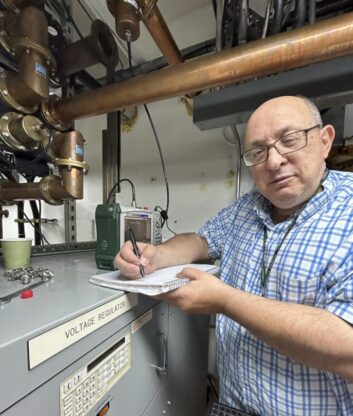
Barry McLellan is a site engineer for Bonneville International. He lives on Farnsworth Peak in Utah, where the company operates three FM stations and recently modernized the site’s master antenna infrastructure.

Radio World: What do you consider the most important recent trend in how broadcasters control and monitor transmission facilities?

Barry McLellan: When something goes wrong at the transmitter site, remote controls are the one device in a broadcast plant that can make or break your BBQ, vacation or just potentially let you get back to sleep for the slim remainder of the night.

[Related: “Salt Lake FMs Soar With New Dielectric Master System”]

The old days were not so good. I’m sure we’ve experienced an overnight part-timer calling late at night from the studios, and you would need to explain how to get readings out of the Moseley MRC-1600 and maybe talk them through a complex process for turning on the aux transmitter in the hope you wouldn’t have to drive to a snowy mountain-top transmitter site at 2 a.m.

A modern remote control at a transmitter site is crucial for monitoring, compliance and control. These systems have improved so much over early remotes that tied monitoring and alarming to a fixed control point.

Along came improved remotes that used a POTs line or cellular connection to get the remote’s data to/from a remote transmitter site. Could anyone else, while almost completely asleep, answer the phone while practically asleep, enter the password, go through the alarm list, run the appropriate macro to get your station back on the air and fall right back to sleep? I was a DTMF master!

These were a big improvement but had limits. The cellular link could be sketchy, it might not pass DTMF tones well, and we’ve all experienced the disappearance of POTs lines.

The biggest improvement I’ve experienced with modern remote controls is the installation of solid IP connectivity at our sites. If a local IP provider is not available, sometimes this means a 5.8 GHz ISM link, a 900 MHz modem diplexed on your STL link, or possibly working with a WISP provider.

The newer IP-based remote controls have so much information available on-screen at once, configured just the way you want these readings to appear. The connection can be left open all day on your work desktop or phone showing all your sites at once for easy, quick access. Plus there is a whole host of new, inexpensive devices to monitor many other situations at your site to make sure there aren’t problems you wouldn’t normally see.

RW: What kind of customization is available?

McLellan: At our site, we’ve expanded the capability of our remote control by adding third-party sensors that work independently but provide a summary output closure to our remote control.

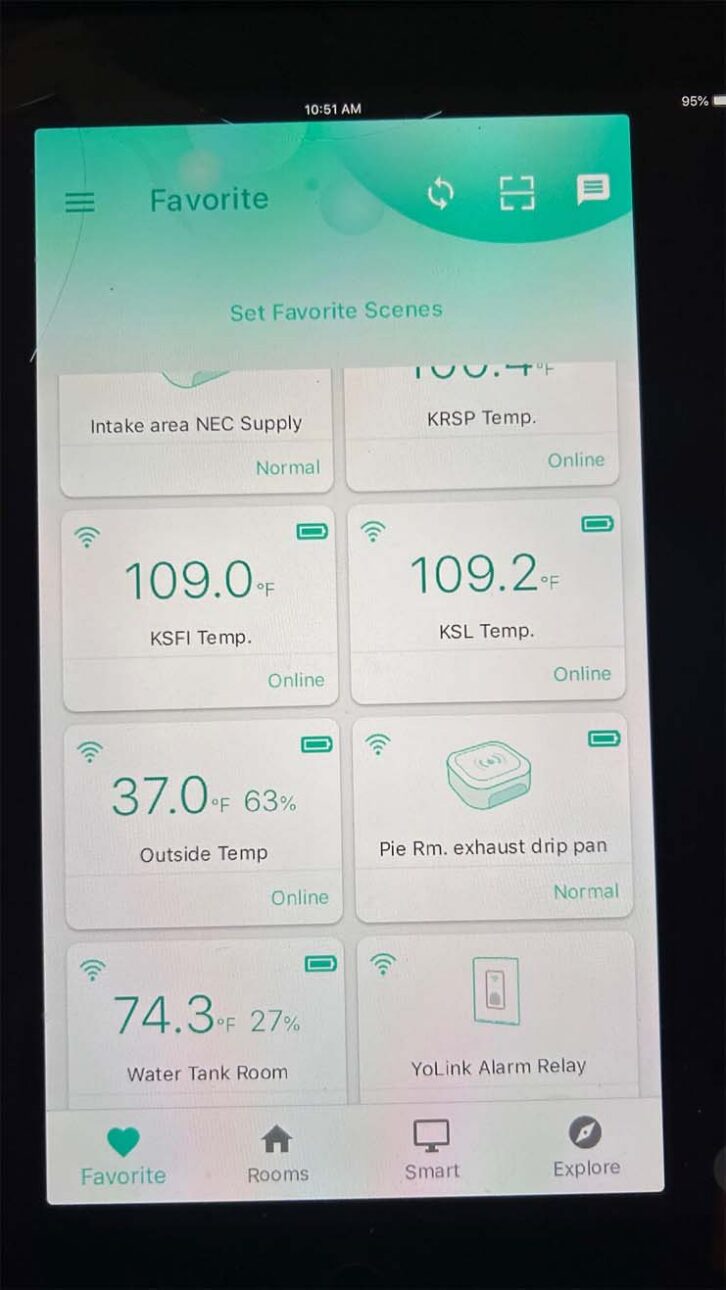
Farnsworth Peak diagnostics on YoLink’s mobile app

These sensors are from a company called YoLink. I like this brand because of the wide variety, low cost and lack of subscription costs.

They have devices for many scenarios: water leak detectors, configurable temperature sensors, door, window, smoke, vibration, power loss, motion detection, remote access, siren, paging, personal alarm fobs, smart relays and outlets.

When an alarm comes from these sensors, we get a push notification on our phones, and sensors we set up as a critical alarms trigger a summary closure to our remote control. These sensors connect wirelessly in the 900 MHz band to an IP-connected hub.

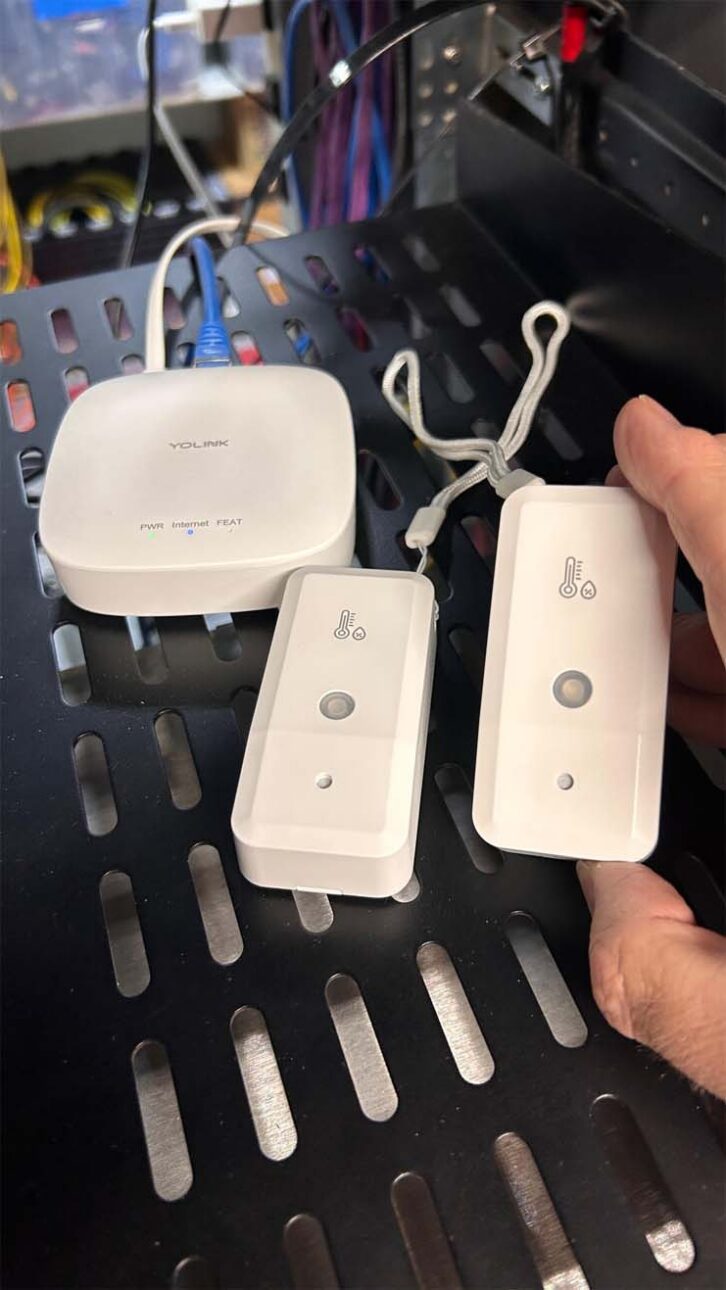
YoLink temp sensors and hub.

This architecture gives you long range in hostile RF environments or even through the steel walls of the building. They are inexpensive. Three temperature sensors or leak detectors with a hub are $55, cheap for the assurance they provide.

We’ve used this gear to protect our site in ways that expand on the remote’s capabilities — leak detectors in ventilation ducts where rain or snow from serious storms could get in and drip on equipment. Also, ambient room temperature and transmitter exhaust temp with alarm trigger points that tie into the remote control. Door, motion, and smoke sensors could also eliminate an alarm systems monitoring costs.

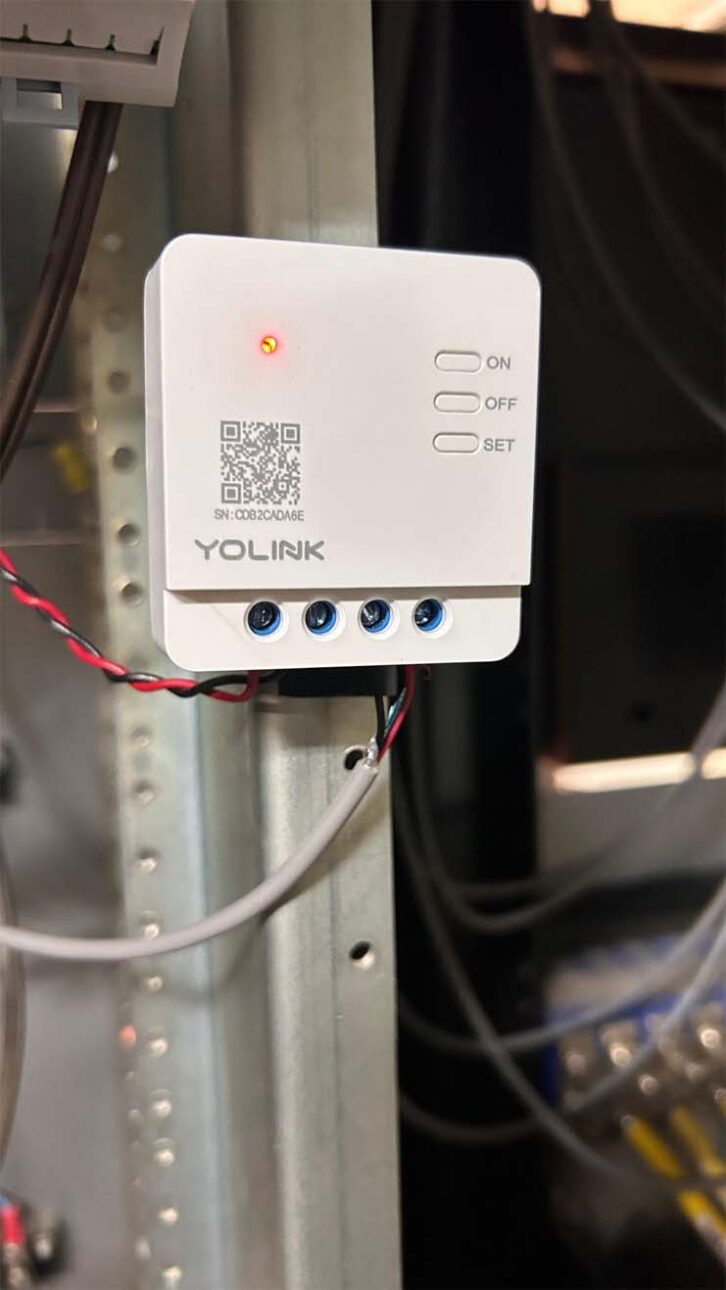
A YoLink sensor in place.

Sensors can be set up this way according to the needs of your site without consuming status/metering channels. So many options exist with this gear.

RW: What kind of connectivity is best suited to supporting today’s needs?

McLellan: Local telcos have priced POTs line out of existence, or the facilities aren’t maintained any longer. Cellular connectivity doesn’t give the reliability or all the functionality I would like.

Ideally, IP connectivity is needed. The addition of an IP drop to your site allows for always-on connectivity and multiple simultaneous connections available. This allows for a graphical interface to your remote control, helping you understand more quickly and completely what’s going on at your site.

If available, fiber to the building would always be preferable to decrease the chance that a voltage surge could harm your gear. An IP connection may also provides a alternate audio delivery path that many stations operating with a microwave STL might not have.

RW: To what extent are broadcasters relying on third-party service providers for remote management of their facilities?

McLellan: I would prefer to see very little third-party remote management since this is a cost that could save all stations money in lean times.

For stations who have a local engineer, that person is the one to handle alarms. No need for the expense in this situation.

With smaller, local operators, since a remote control is needed for compliance anyway, a modern, GUI-based remote could be set up by their contract engineer, to alert several station personnel, maybe the GM and PD to be the first point of contact for potential problems. This should be within the ability of the GM to evaluate and resolve or call in local support.

Large, nationwide broadcasters seem to make sweeping changes like firing local engineers, contracting back services, developing centralized monitoring systems, and initiating third-party services. Maybe it makes sense to the corporate accountants, but I have a hard time believing the cost savings are anywhere near what they expected, and delays in restoration are likely longer than with local support.

For more viewpoints on this topic see the free Radio World ebook “Trends in Remote Control and Facility Management.”

[Check Out More of Radio World’s Ebooks Here]

The post Sensors Help Bonneville Manage Farnsworth appeared first on Radio World.
  •  

Final Thoughts on Liquid Cooling Bubble Up

CPU liquid cooling inside computer.

In two previous articles (starting here), we’ve discussed liquid cooling in transmitters and its applications. The topic becomes even more interesting when we explore the thermodynamics behind the implementation of such systems generally.

While systems for FM transmitters use “anti-freeze” and small pumps, higher-powered systems (think particle accelerators) use deionized clean water, resin bottles, sidestream purification loops and other technology.

While liquid cooling in transmitters may seem complex to a broadcast engineer, it is relatively simple within the wider universe of liquid cooling, where systems for instance serve major military and government applications.

Liquid cooling is found in the studio as well. Microprocessors and graphic chipsets in computers use liquid-cooling technology to pull the heat off and away from the inside of the case.

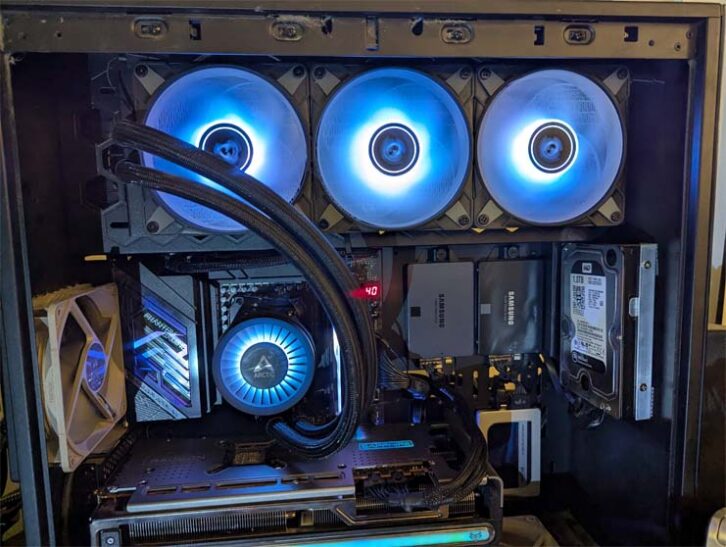
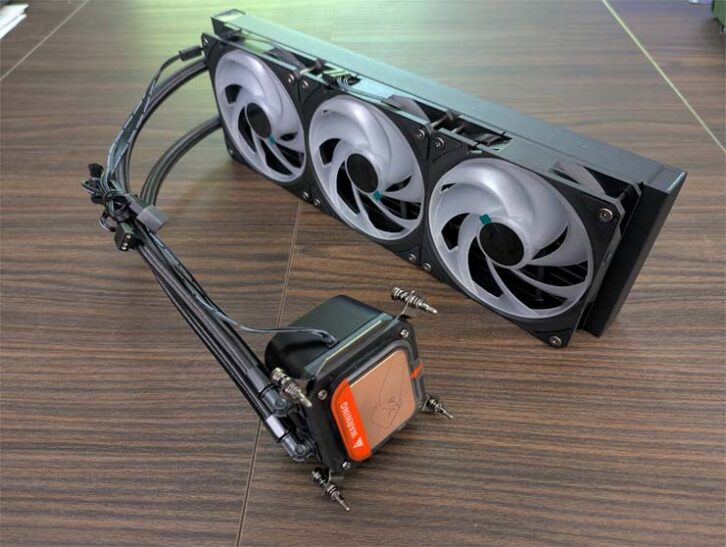
AIO unit fan and CPU water block view.

Liquid cooling has the advantage of allowing larger fans with slower fan speeds to reduce noise, which could be an advantage in rooms where audio is being created.

Gone are the days when liquid-cooling systems meant cobbling together a computer system and doing plumbing in miniature, always concerned that a leak could destroy the computer.

Computer cases are available with liquid-cooling systems for the processor, video card CPUs and other heat-sensitive components.

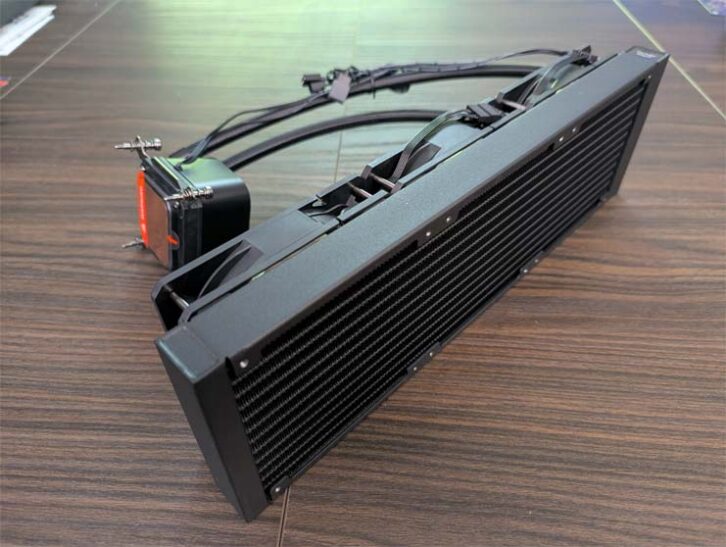
These “all in one” systems have the same components as other liquid-cooled systems but on a smaller scale. There is a pump, a fluid reservoir/radiator with fans attached, a CPU water block (the liquid cooling equivalent of a heat sink) and cooling tubes. The unit comes pre-filled with coolant.

AIO unit radiator/reservoir view.

Applications might be limited to uses like video editing and gaming, but for many users the bright colors and translucent cases used with liquid cooling are an attraction.

Final thoughts

Several final observations about the use of liquid technology in transmitters.

Lower-power transmitters probably do not need liquid cooling. LDMOS devices provide ruggedized compact efficient solutions for amplifier designs. With each new generation of power supplies, efficiency is improved and heat is reduced.

If a low-power transmitter needed liquid cooling it would probably be to compensate for a very compact design. The systems used in desktop computers would provide examples for these applications.

The RF power level at which you might start to consider liquid cooling seems to be around 25 kW. Even at that level, the general case for liquid cooling would be difficult to make without the additional power requirements of digital radio channels.

But readers who have experience with liquid cooling indicate that the benefits and costs we’ve discussed are worth exploring. They remind us that installation should be done with the help of HVAC experienced personnel but they say cost savings can be significant, with few ongoing issues with liquid cooling, which usually can be addressed by staff engineers.

[Do you receive the Radio World SmartBrief newsletter each weekday morning? We invite you to sign up here.]

The post Final Thoughts on Liquid Cooling Bubble Up appeared first on Radio World.

  •