Vue normale

Reçu avant avant-hier

Codecs: Increasingly Smart, Increasingly Flexible

10 février 2026 à 17:30
Abstract cubes collide in a burst of data energy, symbolizing AI logic, data integration, cloud infrastructure, and seamless digital collaboration.
(Credit: Getty Images/Eugene Mymrin)

As part of Radio World’s latest ebook about trends in codecs, we asked a sampling of industry engineers and users for their perspectives on the evolution of codec designs and applications, from remote broadcasts to sophisticated distribution applications. 

Some opted to focus on specifics of their favorite codec brands, others spoke more generally, but all gave insight into the many ways these solutions are serving radio today. Their comments are below, and you can read much more on this topic in the ebook itself.

“A trend that continues and is not a fad is the integration of transport codecs within the broadcast infrastructure via hardware or software that includes associated data, control and timing signals,” said Roz Clark, executive director of radio engineering at Cox Media Group.

“The traditional infrastructure of a broadcast facility continues to evolve, and the ability to add process-intensive capabilities such as PPM, audio processing and other functions to devices that once were designed for a single purpose is moving forward.”

A key requirement of this, Clark said, is to transport all associated signals — not just audio — on time, securely and reliably. 

“Interoperability between the various systems and vendors is key to long-term success and to allow incremental upgrades within the broadcast plant to take advantage of capabilities and efficiencies.”

He said this topic is being addressed in the IEEE-BTSC Aggregated Content Delivery Link standard work currently underway. “The ACDL standard will formalize these requirements and others to ensure interoperability and an international standard to reference.”

How do today’s codecs avoid problems with dropped packets?

Roz Clark
Roz Clark

“The use of multiple disparate network connections that can use the connections simultaneously to deliver the content is an important feature,” Clark said.

“Ensuring the last-mile connections on each end of the circuit uses different physical delivery is important. Network connections that only use physical media that are delivered over a cable or fiber fall victim to backhoe fade, while last-mile connections that are over-the-air such as 4G or satellite can fail for other reasons.”

By mixing these types at a location, risk can be minimized, and service is likely to survive complete outages. 

At Cox, he said: “The use of IPL technology from GatesAir in links between studios and transmitters has opened up opportunities for us to enhance our operational resiliency. This technology takes the traditional point-to-point dedicated nature of an STL to a scenario where it becomes a multipoint-to-multipoint network of content distribution.”

That opens the possibility of flexibly feeding a tower site from alternate locations on demand as part of a BCP program. “If properly configured, the alternate site can maintain normal operations for the station for internal customers, as well as external customers including streaming audio, metadata etc.”

Browse in and go

“Codecs are becoming agnostic to the infrastructure,” said Ed Bukont, owner of E2 Technical Services & Solutions.

“It is no longer so necessary for a user to physically touch the box to make adjustments. You plug in power, network and maybe some local I/O in the field, browse in and go.”

The “box,” he noted, can be anywhere. 

“All of the tech you need is built in, including AoIP and the latest public network protocols. Several popular brands have multiple codecs in one box, all accessed via a network for connection, control and audio — doing more with less, faster, better, cheaper, a better ROI for the expense of the device.”

Ed Bukont
Ed Bukont

Given that more functions in the air chain are now in software, how has this affected workflows? 

“Air chains are generally static except for EAS and backup situations,” Bukont replied.

“By and large, software has made this harder for the installer but easier on the user. A faceless box can have multiple network ports, allowing secure connections to multiple sites while being controlled securely on a management port. 

“Software, and how it integrates at different levels of the OSI model, can allow multiple users and vendors to interact on a common platform from the console, through processing, program delay, EAS, watermarking, STL, all the way into the transmitter, while maintaining a diverse set of reliable paths that may be divergent between content and control.”

Bukont said codecs and a variety of IP connection technologies are making it possible to merge studios while keeping a local presence that was not practical for many even 10 years ago.

“I am less concerned with minute improvements in audio quality that may be masked by background noise of an event. The real advances are in accommodating a diversity of paths via various technologies to create reliable connections with an acceptable fail-over.”

Links to data centers

Lamar Smith, VP and director of corporate engineering at Beasley Media Group, notes that the expansion in use of codecs in radio feels exponential. 

“With the COVID pandemic we scrambled to get as many codec units as possible, from any flavor possible, to allow our staff to remotely work from home,” he said.

“They all served their purpose during that time, but surprisingly, they have continued to be a vital part of what we do daily.”

He said some have changed their purpose a little, but the remote connectivity has continued to be a vital part to all the company’s operations. 

“We are finding the current trend being the use for STL replacements in place of our historical traditional 950 MHz gear and as a way of linking our studies to our data centers, transmitter sites and remote staff contributing to our programming.”

Smith said radio’s familiar tower industry faces a crisis. “It has become too expensive as a way to distribute our content. The delivery of audio to a transmitter site via ISP is a way of limiting the needs on towers for STL antennas.”

Lamar Smith
Lamar Smith

He said the use of data centers to distribute content to transmitter sites plays into this. “We may have a data center on the East Coast but feed content to transmitter sites on the West Coast.”

The need to create more and more multi-channel audio paths means software-based devices must be able to handle a number of paths versus an individual piece of hardware for each codec path. 

“While the hardware handling a single audio codec path is still needed, with all the downsizing we have been going through, the data centers have demanded that we have server-based solutions that can handle a lot of traffic in a small footprint,” Smith said.

“That traffic is everything from the traditional algorithms — linear or ACC — as well as using SIP technology to accomplish the needs.”

Given advances in audio coding, DSP and wireless IP over recent decades, what improvements can still be made in the quality of audio delivered by codecs?

“Reliability and robustness are critical to the operation of our codec systems, and these areas need to be the focus of the manufacturers,” he replied.

“While we have seen massive improvements in reliability from our ISPs, inherent issues of the public internet cause short temporary interruptions as well as jitter and latency.”

The use of multiple ISPs to overcome these issues has proven to be effective, he said. 

“But it’s my opinion that this is an area where we should and will see improvements as manufacturers continue to adapt to the needs of the industry and push for quality audio at near-real time delivery while overcoming public internet obstacles.”

Smith said that in one market, Beasley recently needed to move quickly out of a building that housed its offices and studios because the building was being sold. 

“We quickly implemented a data center implementation that allowed the studios and offices to move within 60 days. Using ISP codecs as a way of linking the audio between temporary studios and to the transmitter sites was critical and made the move viable.

“While we have used the GatesAir IPlinks for years now, we have started implementing stream-splicing on our links that feed the transmitter sites across the public internet. We have done this using dual ISP connections such as a fiber provider and Starlink, for example,” he said.

“Sometimes getting dual ‘good’ ISP connections at the transmitter site is difficult, so we have even found success in implementing on the same provider with enough latency on the second path to overcome the failures of the provider. While this adds to the delay of audio going from ‘live’ to ‘on-air,’ we’ve all moved on from expecting real-time audio on the air years ago.”

Diverse connections

Randy Williams is chief engineer of media and technology company Learfield, which specializes in college athletics. Learfield deploys numerous Comrex codecs. 

“The use of CrossLock or some type of SD-WAN technology within the codec allows two or more diverse IP connections to be installed,” he said.

“The codec unit will monitor the incoming connections and ‘switch/bounce’ to the IP source that has the best reliability and lowest amount of packet loss. This ensures connectivity without sacrificing missing audio bits or downtime.” (By default, the IP codecs aggregate all data connections, but Redundant Transmission mode can be selected.)

He said the codecs do well at avoiding dropped packets.

“By using CrossLock, the codec is placed into a VPN connection where it is managing two different network IP connections, similar to SD-WAN. While a connection is established and running, Comrex employs several error protection and concealment techniques and Automatic Repeat Request, which instructs the codec software to send redundant data, allowing the codecs to reconstruct or resend lost packets. These features are running simultaneously in live streams to reduce audio loss.”

David Tukesbrey
David Tukesbrey

Learfield also has begun a systematic migration to a Wheatstone AoIP platform. “There are processing, compression and level adjustments inside the WheatNet blades or software applications. This is drastically reducing the amount of physical audio cabling that would traverse our building and also is replacing external hardware devices that used to perform the same or similar processes.”

He said Learfield’s Comrex IP rack codecs offer various algorithms for broadcast audio connections with AES digital audio inputs and outputs.

Also useful is the multi-stream feature available in Comrex codecs. 

“By configuring a primary ‘main’ unit in multi-stream mode as the ‘encoder’ unit, as many as 10 other codecs can connect to the ‘encoder,’ providing the same quality audio and relay closures. Learfield has made up to 25 different codec connections in multi-stream mode if only using AAC-Mono as the common algorithm profile.”

Williams is looking forward to a recently introduced product called FieldLink. “Once it is proven in larger Division 1 football and NFL stadiums it will be a game-changer for Learfield. It is a dynamic WiFi Access Point codec that allows roaming field reports to connect via smartphone application and deliver high-quality, full-duplex audio to the producer in the press box or studio. This would eliminate the wireless microphone and IFB systems in use during large-scale sporting event productions.” 

When it comes to doing remote broadcasts, field users tend to focus on the practical aspects.

David Tukesbrey is sports director at Hub City Radio, a group of FM, AM and HD multicast stations in Aberdeen, S.D. He uses Tieline gear in his play-by-play work.

After audio quality, he said, “The most important thing for being user-friendly is a tad bigger screen, so I can get connected to the station. I also like that fact that the codec is versatile in terms of size and weight. It doesn’t take up a lot of space on game day on the desk or table that I use.”

For Tukesbrey, a codec fills many needs.

“I do all my coaches interviews on it, with an SD card for storage, and it’s so versatile. I’ve worked at radio stations where audio quality isn’t prioritized. When I’m calling play-by-play or listening on the radio to a game, I want to hear and feel like I’m there. The codec provides that. And you click a few buttons and you’re connected. Getting connected via Ethernet is simple, and even via Wi-Fi is easy.”

Balance for budget

We close with thoughts from Jeremy Preece, owner of Wavelength Technical Solutions.

“As more broadcasters move to using the internet for audio delivery, it is critical to consider codecs that can effectively handle multiple IP paths, using diverse NICs, and integrate stream-splicing,” he said. “This will minimize glitching and occasional dropouts that are inevitable on shared services, especially on wireless/cellular and satellite internet connections.

Jeremy Preece

“It is also helpful to choose a unit that can provide detailed stream performance and alarm reporting via SNMP, etc., as unrecovered packet losses and similar problems can affect listener experience while going unnoticed on standard audio monitoring hardware.”

Audio codecs have been available as software for some time, he noted, so the technology is well tested in that format.

“Using software codecs can greatly simplify distribution from a studio to multiple tower sites and your station’s website and mobile apps. Codecs can also run in the cloud, reducing on-prem hardware and reducing failure points.”

Preece said hardware codecs still have a place, but software models should not be overlooked if redundancy and scalability is a consideration.

Given advances in audio coding, DSP and wireless IP over recent decades, what improvements can still be made in the quality of audio delivered by codecs?

“While it is possible to deliver decent audio at lower bitrates than ever before, broadcasters should budget for the bandwidth to use the highest bitrates possible,” he continued.

“For primary audio paths, choose a codec that can use modern algorithms — AAC+ etc., never MP3 — and whenever possible use 192k or higher. Even better, use microMPX, which provides exceptional audio quality, with stereo pilot and RDS, at bitrates comfortably as low as 384k. 

“If your link budget allows, consider going linear/uncompressed to maximize quality. For emergency or cellular modem backups, that’s a good place to sacrifice quality for reliability and cost-efficiency.”
And when he’s in the market for a codec, Preece bases the purchasing decision on the project goal. 

“A platform for a multi-booster FM+HD SFN system will involve a lot more complexity than a basic IP-STL,” he noted.

“The first step is to accurately identify your needs: Are you sending analog L/R audio, AES, AES192 or MPX? What about metadata, E2X or other IP data services? Consider IP redundancy: Do you need a second or third built-in NIC or will one suffice? 

“If HD Radio content is in play, give careful consideration to the delivery method and where the HD equipment is placed. In some cases, sending I2E or E2X from the studio to a tower site may be more cumbersome than simply encoding three or four AES audio streams with a separate IP link for PAD. If you’re not sure what the best solution is, reach out to a sales rep or dealer and ask them to walk you through options. There may be five ways to do it, but only one that is truly the best for your scenario.”

Comment on this or any story. Email radioworld@futurenet.com with “Letter to the Editor” in the subject field.

Read more expert comments about codec designs in the free ebook.

The post Codecs: Increasingly Smart, Increasingly Flexible appeared first on Radio World.
GatesAir: Never Expose Transmitters to the Public Internet

6 février 2026 à 19:22

Resilient cybersecurity comes in multiple forms for radio stations these days.

The Federal Communications Commission sent out a notice on Jan. 29 urging communication providers, including broadcasters, to safeguard their infrastructure against ransomware, citing multiple attacks suffered by small- and medium-sized communication companies last year.

Meanwhile, transmitter manufacturer GatesAir urged its customers to never operate its network-capable equipment on networks directly exposed to the internet, as a result of multiple “confirmed radio cyber-intrusions” this week.

We’ve also reported on the multiple audio chain compromises as a result of malicious access to station IP-based STLs, of which the commission sent an advisory notice about back in November.

Never, ever over the internet

The Alabama Broadcasters Association sent out a notice to its members of WKXM(FM) in Winfield, Ala., of an RBDS-based display text compromise on Thursday, as we noted.

Then, GatesAir shared a security advisory on its social media accounts Friday morning regarding multiple “confirmed radio cyber-intrusions” within the last day of its posting.

“Never expose transmitters and control systems to the public internet,” the manufacturer wrote. It’s unclear if these mentions were about the same incident.

A separate posting we saw on social media indicated that a broadcaster’s Flexiva transmitter control was accessed over the internet by a malicious actor.

That actor was able to switch the transmitter’s RDS setting from an external encoder to the Flexiva’s built-in encoder, and it was used to project a racial slur over its scrolling program service data.

GatesAir pointed to a service bulletin it released on Dec. 19 for guidance.

The manufacturer underscored that its transmitters should only be internet-reachable only when access is mediated by security controls, such as through a VPN, a firewall with default-deny rules, an isolated management network or VLAN or a centralized NOC system behind protected infrastructure.

In all of those situations, the transmitter would not have a public IP, no ports are open to the internet and its access should be authenticated, logged and controlled.

Even if passwords are set, HTTP is enabled and access “seems to work,” if the internet can initiate a session directly to the transmitter, GatesAir said, the transmitter is internet-facing, and that configuration is not supported by the manufacturer.

Ransomware

In the FCC’s Jan. 29 public notice, meanwhile, its Public Safety and Homeland Security Bureau emphasized the ramifications of a ransomware attack, including time and service disruption, as well as any financial ransom needed to regain compromised files.

Depending on their effects, ransomware attacks may also require reporting the attack to the FCC or federal law enforcement, the commission said.

If the attack results in the unauthorized transmission of Emergency Alert System codes or attention signals, it must be reported to the FCC Operations Center within 24 hours.

The commission recommended that, regardless, ransomware attacks be reported to the FCC and federal law enforcement for their situational awareness and assistance.

The commission cited a Cyble threat landscape report that noted a four-fold increase in ransomware attacks against communications providers since 2021. Ransomware attacks are not limited to major carriers, the report noted, but also affect regional operators and vendors.

The Michigan Association of Broadcasters summarized several of the best practices the commission recommended to safeguard operations against ransomware.

They include:

  • Turn on Multi-Factor Authentication for email, remote access, VPN and cloud services.
  • Verify offline backups and test that you can restore from them.
  • Update and patch operating systems, automation and remote access tools.
  • Train staff to recognize phishing and social engineering emails.
  • Limit access privileges and segment office networks from on-air systems.

[Related: “Your Station’s Cybersecurity Matters Most Now”]

The post GatesAir: Never Expose Transmitters to the Public Internet appeared first on Radio World.

The Stream Is as Important as the Transmitter

5 février 2026 à 17:54
Jeff McGinley
Jeff McGinley

This is one in a series of interviews about best practices in streaming.

Jeff McGinley is the vice president of engineering at SummitMedia. His career includes work at Entercom and the Telos Alliance.

Radio World: How important is streaming to SummitMedia’s operations?

Jeff McGinley: It’s incredibly important. I’d say it’s almost on the same level as keeping the transmitters on the air. There’s a big focus on digital, especially with sales, as it’s a part of our packaging. We pay close attention, to make sure all of our streams are constantly on and constantly getting the correct metadata. 

At this point, streaming is as important as the terrestrial broadcast, and it will only get more so as newer automobiles have more internet and Wi-Fi capabilities.

RW: Can you share what streaming solution SummitMedia has adopted?

McGinley: We made a big shift at the start of 2024, when we flipped every single station in our company over to the Telos Forza with its Z/IPStream platform. We send that new stream out to RCS Revma. The combination has been great for us. The Forza portion — the audio processing part — sounds amazing. 

RW: Why is the processing aspect so important? 

McGinley: Everything’s different now. You’ve got Bluetooth speaker setups in every office, and making the stream sound great has become much more of a thing. The fact that Telos integrated the Forza processing into the Z/IPStream software is really cool. This integration helps a lot with level matching, which used to be a big problem with inserted ads on streams.

RW: You mentioned metadata. Is sales taking advantage of it for streaming too?

McGinley: We also helped develop the RCS AudioDisplay tool, and we have since adopted it. It allows text and image advertising content delivered in sync with audio onto our streams. In our Wichita market, in particular, that has been a significant boon with an area law firm. 

RW: Speaking of best practices, what do you think is the biggest, overarching trend in streaming evolution over the last few years?

McGinley: I think it’s the shift towards built-in processing and loudness control. The big players have latched on, and it’s built into their offerings. If you look at any radio station’s marketing material today, you’re going to have “stream us online.” For smaller, “mom-and-pop” stations, they still have to have a stream — probably more so now than anything else.

RW: What about the issue of latency between the terrestrial signal and the stream?

McGinley: I don’t think the latency makes a difference for most music formats. The one exception is live sports broadcasts. That is probably the only real scenario where you’d notice it. However, we as broadcasters have little control over that. We can get low latency until we give it to our provider, but after that, we have zero control over what happens.

RW: Does SummitMedia use cloud-based solutions, and how does that affect streaming?

McGinley: Absolutely. We use RCS’ disaster recovery solution called Zetta Cloud DR, which is hosted through AWS. It syncs up with our local Zetta databases, and, if needed, I can hit “start” and it plays out of the cloud to a Barix, which then goes directly into our final processor. This is essentially a stream coming out of the cloud. 

While we don’t use it for streaming specifically, you absolutely could host the processing, like Forza, and do the Z/IPStream all within the same AWS client to send to your streaming provider.

Read more features like this one in our free ebook, "Streaming Best Practices."
Read more on this topic.

RW: Alright, then what’s holding you back from moving to a full cloud-based air chain?

McGinley: Right now, it’s the cost of bandwidth. AWS is expensive. Once that price per megabyte streamed comes down, we’ll probably see more reliance on the cloud. Companies are trying to decrease their physical square footage, and as hosting fees go down, it becomes more cost-effective than paying for a large rack room in an office lease.

RW: What is one of the most common technical mistakes you still see with streaming?

McGinley: I think it goes back to where we started: audio fidelity. A lot of engineers are still in the mindset that people are listening on a laptop speaker and won’t hear a difference. As the stream becomes as important as the terrestrial signal, you cannot sleep on that. You can’t just pull out an old Aphex 320A Compellor or an Orban 8100 out of the closet and say “That’s good enough.” It’s not. People really need to pay attention to sound quality for their streams now.

Read more on this topic in the Radio World ebook “Streaming Best Practices.”

The post The Stream Is as Important as the Transmitter appeared first on Radio World.

More Musings About Liquid-Cooled Systems

3 février 2026 à 15:00

In an article in an earlier issue, I introduced basic concepts of liquid cooling and considerations to keep in mind when shopping for an FM transmitter. 

The topic brings up more questions than answers, so let’s try to clarify some of the issues.

Liquid cooling circulates “anti-freeze” through various elements of your transmitter. Generally, this includes the power amplifier modules, possibly the power supplies and of course the pumps, which may be housed inside the transmitter or in a separate rack nearby. 

When a liquid-cooled component is removed, the valves of that component, both in and out, must be shut off. In some cases, you’ll bypass the component by turning valves manually, in other cases, the valves are automatic. “Plug-and-play” takes on a more complex meaning when liquid is a factor. 

Case study

This is an example of how to bypass a defective pump for replacement.

Panel on a Rohde & Schwarz liquid-cooled FM transmitter
Fig. 1: The panel on a Rohde & Schwarz model.

Fig. 1 shows a panel on a Rohde & Schwarz model (the two pumps are visible at the bottom of the picture). It provides a parallel pump scenario that could be found in many types of equipment that use liquid for cooling. 

There are two valves visible, VH1 and VH3, set to Normal Mode. The diagram, in closeup in Fig. 2, shows how to turn the valves for maintenance modes for Pump 2 or Pump 1. Setting these allows you to bypass the malfunctioning pump and replace it while losing only a small amount of fluid. 

Diagram showing how to turn the valves for maintenance.
Fig. 2: The diagram shows how to turn the valves for maintenance.


Once the liquid is no longer going through the defective pump, you can replace the pump. Fig. 3 provides a view of the pumps; you can also see VH2 below the pumps.

A view of a liquid-cooled FM transmitter's pumps, with VH2 visible below.
Fig. 3: A view of the pumps, with VH2 visible below.

Luckily, you don’t need to replace the heavy black iron of the manifold on the back of the pumps. You can remove the pump from the front of the manifold with four silver Allen screws. 

The tougher part involves the electrical and control connections; you need to take apart the front readout cover and disassemble the front of the pump. Caution: One of the small connectors has high voltage, so you must trace both cables to the control board and disconnect before you unplug anything. 

Other considerations

Maintaining a liquid-cooled system adds to your upkeep routine, but the main challenge will be completing the installation and setting liquid levels correctly in the transmitter. 

The heat exchangers must be installed adjacent to the transmitter on the outside of the building. This involves cutting holes in the building for the liquid plumbing and the wire harnesses that connect the heat exchanger, fan monitoring and controls to the system. 

Then your custom “plumbing” also may involve cutting large copper pipe or hoses, assembling connectors, routing and supporting the piping. 

Once the system passes a pressurization test, liquid coolant is pumped into the system. Typical steps include priming the filler pump manually and filling the system with a hose and buckets of coolant provided by the transmitter manufacturer. (This task is almost impossible without several people.) 

Typically, bleeding out the air involves opening valves at the highest point of the plumbing. Those will need to stay open for hours or days to finish this task, though the transmitter may be allowed to run in some configuration. 

The transmitter control system should be providing the data necessary to determine if the liquid-cooling system is coming up to proper pressure and the pumps and heat exchanger fans are operating correctly. 

Other than these liquid aspects, your procedure for installing a new transmitter is much the same as with an air-cooled transmitter, without the exhaust fans of course.

A few factors I look for when recommending transmitters:

  1. In any transmitter, power amplifier modules are going to fail. Typically, these cannot be repaired in the field. Ask up front about replacements, repair policies and warranties. Investigate the difficulty in changing them out and shipping them. 
  2. Power supplies: Are they custom-made for this transmitter, or generic and available “off the shelf” from various suppliers?
  3. The liquid used. Is it available only from the transmitter company, or can it be made on site by combining automotive antifreeze and water?

Every situation is different. But speaking generally, liquid cooling will reduce heat loading in your transmitter building, saving you money that you might spend to buy, run and maintain larger HVAC systems to support air-cooled transmitters. Removing heat from components through the direct contact of the liquid is more efficient than air cooling. But the complexity of liquid cooling will involve more upfront costs. 

It all comes back to return on the investment. Perhaps the biggest question for a station owner is how long they plan to own the station. Fluid cooling will almost always save money over the long run. Transmitter companies can provide an analysis to help the station owner choose between liquid- and air-cooled models and estimate how long it will take to repay the additional cost of fluid cooling through reduced electricity usage.

Read a 2019 article by Don Backus of Rohde & Schwarz with more about maintaining liquid-cooled systems.

The post More Musings About Liquid-Cooled Systems appeared first on Radio World.

Metadata as a Second Language

17 janvier 2026 à 15:00
Rick Bidlack

The author is a development engineer for Wheatstone. This is excerpted from the Radio World ebook “Streaming Best Practices.”

If content is king and metadata is queen, it would be perfectly reasonable to expect that we have all the metadata standards worked out.

But, in fact, we’re far from anything of the sort. Metadata tags, types and formats for song title, artist, etc., are all over the place, and getting that data from your automation system out to the CDN and onto listener devices is a lot like trying to learn several languages at once. 

Metadata, as we all know, comes in the form of song title and artist name as well as sweepers, liners, station IDs, sponsorships and text of all sorts that show up on your listeners’ players. 

But that’s just the tip of the metadata iceberg. 

If you have a live program that you want to turn into a podcast for later download, we use metadata as an easy way to trigger when to start and stop recording. Metadata is used to trigger ad replacements from on-air to in-stream and to switch between sources when, say, during a live sporting event certain programming needs to be replaced by streamable content. Specific metadata syntax can trigger a switchover to another source and to target ads by location or demographic, all dynamically and with incredible precision by Zip code, geolocation, device type and more. 

All of that starts and ends with metadata, which has its own standards, protocols and ways of doing things at each point in the process.

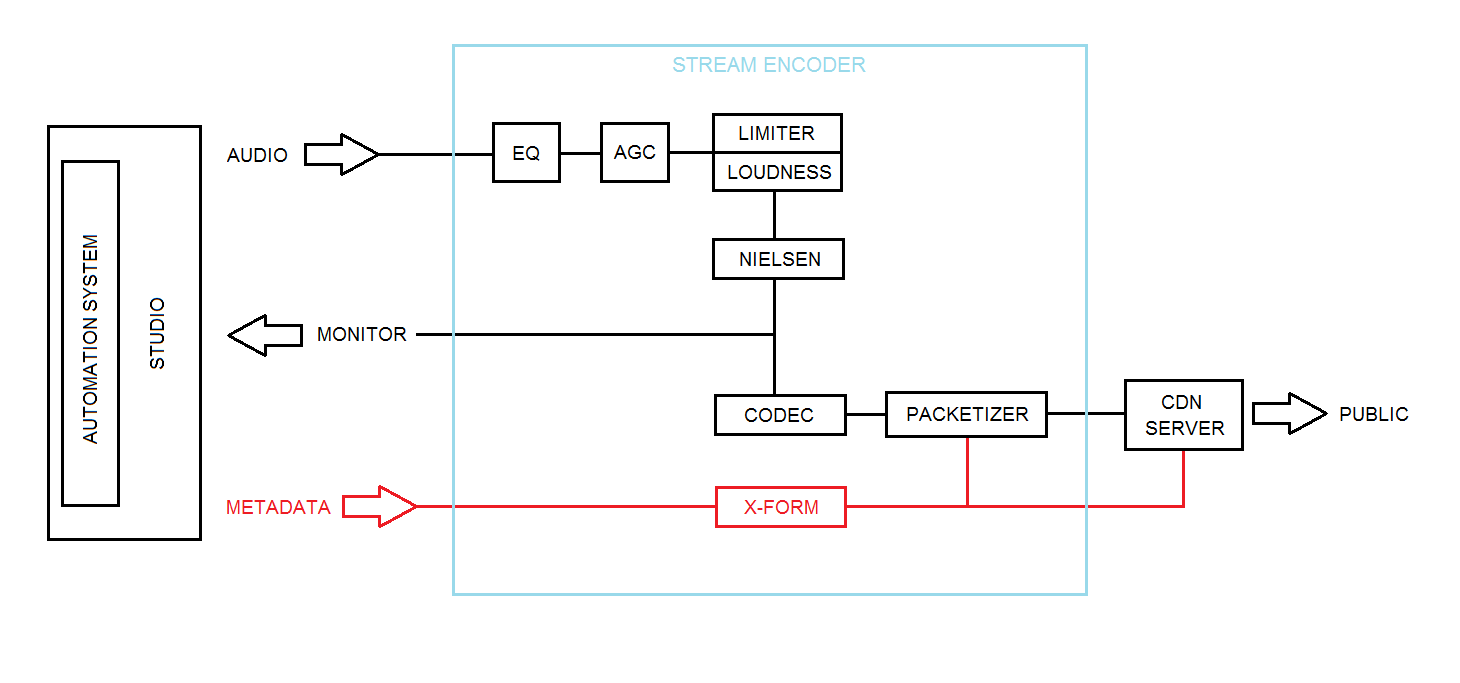
On the one end is the CDN, which takes streams and metadata from the station studio and sends it out to listeners. On the other end is your studio, which includes your automation system, your routing system and an encoder such as our Wheatstream or Streamblade appliance that performs all stream provisioning, audio processing and metadata transformation and sends it all off to the CDN.

The stream encoder has three jobs: 1) process and condition the audio, optimizing it for the compression algorithms to give it that particular sound the same way an FM processor does; 2) encode, packetize and transmit the program over the public internet to the destination server, the CDN; and 3) handle the reformatting and forwarding of metadata from the automation system to the CDN.  

Fig. 1: The components in Wheatstream/Streamblade encoders with the metadata section, and the Lua transform filter in particular, in red.
Fig. 1: The components in Wheatstream/Streamblade encoders with the metadata section, and the Lua transform filter in particular, in red. Click to enlarge.

To handle the important task of handing over the right metadata at the right time and in the right format, our Wheatstream and Streamblade encoders use transform filters written in Lua (see Fig. 1), an embedded scripting language that can parse, manipulate and reformat data based on specific field values, content, or patterns that would be difficult to define with conventional methods. 

Lua transform filters give us a way to map what’s coming in to what’s needed to come out of the studio in order for CDNs to be able to pass on the metadata.

It starts here

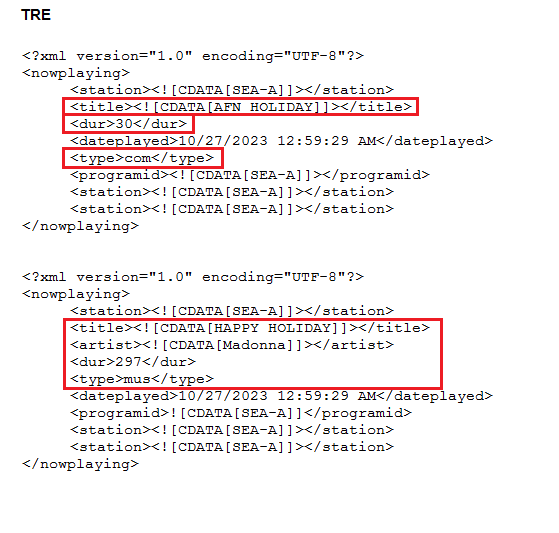
Fig. 2: Two metadata events from a TRE server. Top: a 30-second commercial. Bottom: a 297-second song. Not all of the data is meaningful to anyone or anything other than the computer that produced it. Useful data, or what the Lua transform filters are looking for, is outlined in red boxes.
Fig. 2: Two metadata events from a TRE server. Top: a 30-second commercial. Bottom: a 297-second song. Not all of the data is meaningful to anyone or anything other than the computer that produced it. Useful data, or what the Lua transform filters are looking for, is outlined in red boxes. Click to enlarge.

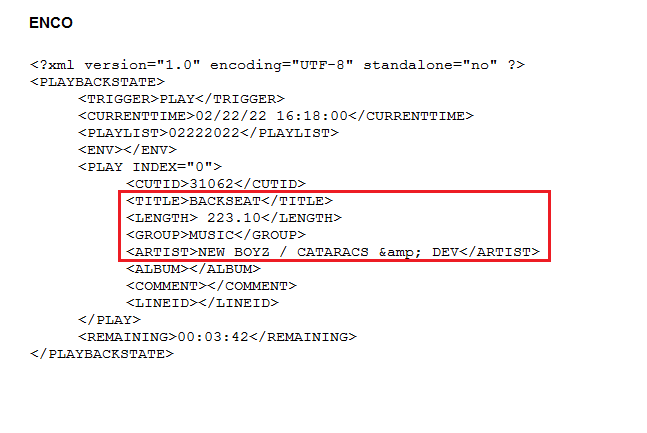
For broadcast purposes, metadata begins in the studio. Artist and song title metadata typically comes from the automation system and is often synced with the music. Metadata is received by the stream encoder on a TCP or UDP socket, and most commonly arrives formatted as XML. What happens after that depends to a large extent on the transport protocol being used by the CDN, the details of which differ because there are no universally accepted standards for handling metadata (see Figs. 2 and 3).

Fig. 3: A song event from an ENCO system. Note the “ampersand” HTML entity in the Artist tag; it will need to be replaced with an actual ampersand character or equivalent URL encoding ‘%26’ (depending on how this event is transmitted to the CDN) in order to display as an ampersand rather than the obtuse string ‘&’. There are similar HTML entities for all special characters that have syntactical meaning within the transmission format. Dealing with character encoding, decoding and transcoding is part of the job of the transform filter.
Fig. 3: A song event from an ENCO system. Note the “ampersand” HTML entity in the Artist tag; it will need to be replaced with an actual ampersand character or equivalent URL encoding ‘%26’ (depending on how this event is transmitted to the CDN) in order to display as an ampersand rather than the obtuse string ‘&’. There are similar HTML entities for all special characters that have syntactical meaning within the transmission format. Dealing with character encoding, decoding and transcoding is part of the job of the transform filter. Click to enlarge.

What the CDN sees

CDNs use various protocols, and depending on the protocol, metadata is either injected into the audio streaming, in the case of protocols HLS, Triton MRV2 and RTMP, or sent separately, in the case of the Icecast protocol. 

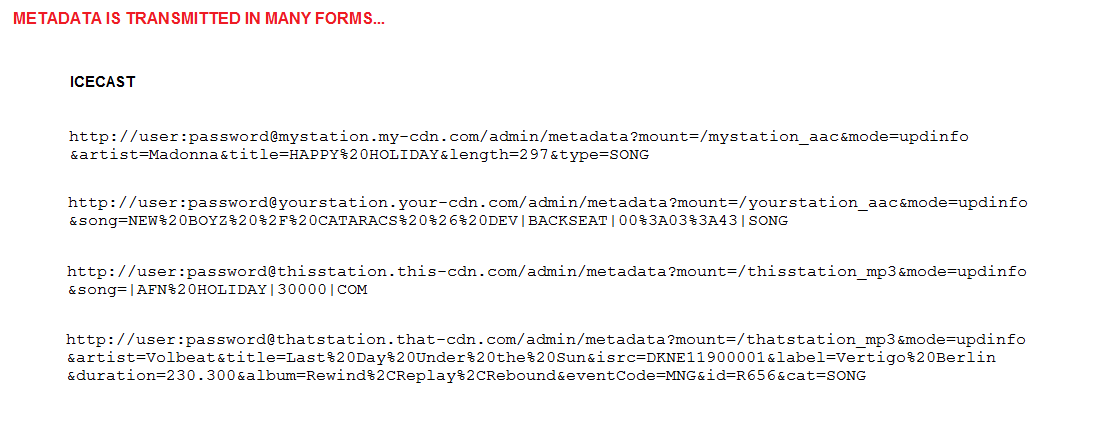
Fig. 4: Four examples of HTTP metadata update messages transmitted to Icecast servers. They all start out more or less with the station’s credentials, followed by the DNS address of the CDN’s server, followed by boilerplate signifying a metadata update, along with the mount (the endpoint we are sending our stream to) to which this update pertains. After this, formats might diverge.
Fig. 4: Four examples of HTTP metadata update messages transmitted to Icecast servers. They all start out more or less with the station’s credentials, followed by the DNS address of the CDN’s server, followed by boilerplate signifying a metadata update, along with the mount (the endpoint we are sending our stream to) to which this update pertains. After this, formats might diverge. Click to enlarge.

For Icecast, metadata is sent as an independent stream separate from the audio (Fig. 4). HLS, the HTTP Live Streaming adaptive bitrate streaming protocol by Apple, is a common protocol used in contribution networks that feed into CDNs, and many CDNs have also adopted HLS for carrying metadata with audio in the same stream.

For example, in HLS, metadata such as artist, title, duration, album, album art, fan club URL, etc., are formatted as ID3v2 tags and inserted into the MPEG3-TS segments between AAC frames. Metadata involved in switching between program content and ad-insertion is commonly written to the manifest file (constantly updated with the addition of each new TS segment and aging-out the oldest) in the form of SCTE-35 splice points.

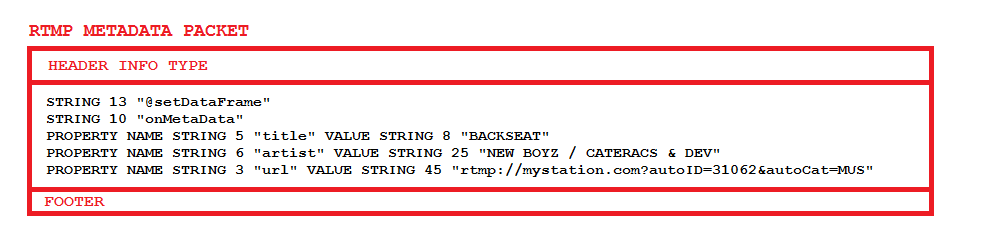
Fig. 5: A schematic representation of an RTMP packet carrying metadata for a single event. The labels STRING, PROPERTY, NAME and VALUE are not to be taken literally, they are human-readable representations of specific byte values in the AMF structure.
Fig. 5: A schematic representation of an RTMP packet carrying metadata for a single event. The labels STRING, PROPERTY, NAME and VALUE are not to be taken literally, they are human-readable representations of specific byte values in the AMF structure. Click to enlarge.

Meanwhile, RTMP metadata is encoded into a “setDataFrame” message using the Action Message Format (AMF) developed originally for Flash applications (Fig. 5). (Despite the demise of Flash video, RTMP itself is still in active use for backhaul streams up to the CDN.) 

Metadata is represented in serialized structures called AMF arrays. The entire message is wrapped in a standard RTMP packet and inserted into the outbound stream along with the audio packets. 

A CDN knows when to switch to ad insertion and when to switch back to normal programming based on the category of the metadata itself. Most CDNs are expecting incoming metadata events to be categorized into three types: songs, ads (spots) and everything else (sweepers, liners, station ID, PSAs, etc.). Ad insertion begins the moment the CDN receives a COM or spot event and ends when the CDN receives any other event. Metadata tightly synced with audio is critical for making sure that data matches the actual audio for spots as well as music. 

There are many ways to customize and create special conditions that can be transmitted to the CDN with the proper signals, as long as both parties agree on what the signals are.

Job 1

Job No. 1 for our Streamblade and Wheatstream encoders is to hand off as much relatable and useful data as possible to the CDN, whose main function is to serve your stream to thousands or tens of thousands of listeners. 

The twin facts that A) your program and all associated metadata passes through the CDN’s servers; and B) they know who is listening, from what location, and for how long mean your CDN provider has the ability to give you a whole suite of add-on services. 

A big one is ad insertion or replacement, which is usually geographically based, but could also be tailored to whatever can be deduced about the individual listener’s tastes and habits. 

Geo-blocking, logging, skimming, catch-up recording and playback, access to additional metadata (e.g. album art, fan club URLs), listener statistics and click-throughs, customized players, royalty tracking, redundant stream failover, transcoding from one format to another — these are some of the services that CDNs typically provide. Thus, the CDN basically controls the distribution of the stream to the listening public. It is the responsibility of stream encoders like our Wheatstream Duo and Streamblade — the origin server to the CDN’s ingest and distribution servers — to make sure that the CDN gets the right data at the right time and in the right format. 

Especially with regard to metadata, the stream encoder is the mediator/translator between the automation system and the CDN that can open opportunities for ad revenue and more.

Streaming is an actively evolving technology, and it’s probably still in its infancy. The queen of streaming, metadata — how it is carried, how it is used — will likely continue to evolve along with it.

[Do you receive the Radio World SmartBrief newsletter each weekday morning? We invite you to sign up here.]

The post Metadata as a Second Language appeared first on Radio World.

Take Care of Your Listener’s Ears

14 janvier 2026 à 20:00

This is one in a series about best practices for streaming for radio stations.

Karl Lind is chief engineer with Northwestern Media, servicing approximately 30 full-time FM stations and translators as well as one AM daytime station in Iowa and Missouri. 

Radio World: Karl, what would you identify as the most important trend in how audio streaming technology or workflows have evolved for radio companies?

Karl Lind, chief engineer, Northwestern Media
Karl Lind

Karl Lind: In recent years, this industry has seen a decline in traditional over-the-air broadcast reception in homes, coupled with an exponential increase in the number of smart home devices natively capable of internet-based streaming. Fewer individuals and families leverage traditional broadcast in their homes; in many cases, homes will be found without a radio. 

As the demand for over-the-air broadcast continues to decline outside of the motor vehicle, radio broadcasters need to acknowledge the decline and prepare to leverage online content delivery as the next generation of home radio listening. 

RW: What kind of processing do you use, and is it different from your on-air?

Lind: Within Northwestern Media, we utilize a few different processors for our webstream encoding. 

In all cases, the device handling the stream encoding is responsible for the audio processing. As an organization that employs Telos Omnia.9 at many of our flagship stations, we use either the Omnia.9’s internal stream processor and encoder or Claesson Edwards’ BreakawayOne audio software processor and encoder. 

While the processing on our streams is remarkably like the sound of our FMs, the stream’s density is reduced to compensate for lossy compression algorithms. The result: Omnia quality processing on both FM and webstream. The webstream audience is growing, so we are making sure we prioritize the listener experience just as we would our FM signals. 

RW: What techniques would you recommend for maintaining audio quality for streaming audio and podcasting?

Lind: Take care of your listener’s ears. 

Broadcasters need to carefully balance compression algorithms, bitrates and processing. For streaming audio, stations need to consider their bandwidth capacity, billing for CDNs (as applicable), and revenue potential. For a highly profitable webstream, you may want to consider a higher bitrate and a more standard algorithm. The higher your bitrate, the better your sound, but the higher your streaming provider bill. 

Carefully balance all three points and remember to prioritize your listener’s experience over your profit margin. 

Speaking to specific recommendations for streaming, I always set a hard deck in compression method of 96 kbps HE-AACv1. I have found anything below that bitrate and algorithm (even utilizing HE-AACv2) to possess noticeably poorer fidelity, especially once you introduce processing. 

There is a vast number of combinations you can use to deliver your content, but the aforementioned configuration should get you started in the right direction if you’re trying to get your stream off the ground.

RW: How can broadcasters monitor all their streams efficiently?

Lind: Being able to monitor and alarm on stream issues is becoming increasingly more important as stations’ streaming audiences grow and engineering forces shrink. Inovonics recently developed its 611 Streaming Monitor, which can monitor and alarm up to 30 different streams in stream rotation. The 611 is compatible with SSL, Icecast and HLS, making it versatile in all modern and legacy stream deployments. With consideration toward simplicity and reliability, we’ve found the 611 to be the best choice for monitoring our audio streams.

Read more on this topic in the ebook “Streaming Best Practices.”

The post Take Care of Your Listener’s Ears appeared first on Radio World.

Measure, Measure and Measure Again

10 janvier 2026 à 15:00

When I was on the road servicing stations, I kept an RF spectrum analyzer in my truck. I used it frequently to measure station performance and to verify that all RF output was within licensed parameters. 

I discussed this in my article “How an RF Spectrum Analyzer Can Help You” in the Nov. 5 issue. But I am prompted to expand this discussion after seeing that the FCC recently issued a notice of violation to the owner of an FM transmitter in California. 

Per the notice, FCC Rule 73.317 (d) states: “Any emission appearing on a frequency removed from the carrier by more than 600 kHz must be attenuated by at least 43 + 10 Log10 (Power, in watts) dB below the level of the unmodulated carrier, or 80 dB, whichever is the lesser attenuation.” 

The station in question apparently had violated the rules. The owner was told to make it right at the site and with the FCC. 

I suspect some translators of AM stations and LPFMs have never been measured and are in violation of FCC rules. Every licensee is responsible for keeping equipment in compliance. Remember, violations look bad on a station’s record at renewal time. There are often legal fees too. 

This particular notice was published just when we thought the FCC wasn’t out there checking very much.

When to measure?

You should measure when you:

  • Turn on a new station
  • Replace a transmitter
  • Install an auxiliary transmitter
  • Turn on a translator for an AM station
  • Add something as innocent as an RDS subcarrier
  • Replace audio processing

Basically, measure whenever you make a change that might affect the RF bandwidth of the station. FCC rules haven’t changed in this respect — they are intended to protect ALL licensed users of the RF spectrum.

Documentation reports are required to be kept for two years. I recommend you keep the latest report on hand, even if it is older. The report is a benchmark for the future.

FM

Normally we think of the piece of radio spectrum for which a station is licensed. With +/– 75 kHz of FM modulation, each station is allotted 200 kHz of bandwidth. Allowed emissions decrease farther out from the assigned frequency.

Yes, a new transmitter will have been checked at the factory and found to be compliant with FCC rules, but that doesn’t mean it will play well in an RF environment. 

The most common problem is when a signal from a nearby transmitter comes into a transmit antenna and mixes in the transmitter’s power amplifier. This is when we find mathematical sum and difference products that don’t make specs. 

Example: A new transmitter is on 95.1 MHz while a nearby transmitter is on 94.1. They mix in the new transmitter and out comes an unwanted signal on 96.1 MHz. Oops! 

An RF filter in the antenna line will be required here to knock down the incoming 94.1 so the mix product on 96.1 is less. Assuming that filter is of the bandpass type, it will further attenuate the unwanted 96.1 MHz. A filter will likely be required at the 94.1 station too. 

Mixing of signals is inevitable; it is a matter of how much. The goal is to keep unwanted radiation sufficiently low so as to comply with the rules. 

The FCC requires better in some special cases. I once had to prove that an FM station was RF clean into the aviation band (118 to 137 MHz). The mandate was to keep any radiation at or more than 88 dB below the station’s carrier in its 10 kW transmitter. The normal requirement is 80 dB. That extra 8 dB or more was difficult to measure, but I got it done so the station could go on the air.  

There was an occasion when a 5 kW FM transmitter was being installed on a site that had three 20 kW transmitters. I knew there would be RF mixing products, but how much? 

I connected a spectrum analyzer to an RF sample element in a section of the transmission line to the antenna. Holding my breath, I turned the 5 kW transmitter on and let the analyzer display all of the signals in the FM band. Then I turned the transmitter off and did the measurement again. 

The difference between the two displays was dramatic, with many unwanted signals generated in the 5 kW transmitter from all the other signals. That gave me enough data to determine what type of filter was required to put the station in compliance. 

For perspective, sum and difference RF mixing products are limited only by the bandwidth of the RF output network in the transmitter and the antenna. Solid-state transmitters are more susceptible than tube transmitters because their output networks are more broadband. I have seen where replacing a tube transmitter with solid-state required a new RF filter.  

RF harmonics, as you may know, are mathematical multiples of a station’s operating frequency. For FM, that means measurements for compliance up to 1 GHz. 

This is not normally a problem. However, one manufacturer ran into this and used tiles in transmitter power amplifier cavities to absorb unwanted frequencies. The military band ranges from 225 to 400 MHz. You don’t want to cause problems there!

I remember an instance where a 5 kW FM Collins transmitter passed all of the FCC-required measurements. But a cellular company called shortly after it went on the air to say they were getting unwanted signals in the 800 MHz cellular bands. 

Investigation showed the signal to the antenna was clean but there was unwanted radiation coming from the transmitter itself — it was “cabinet radiation”! Copper hardware cloth over the air intake and exhaust ports helped but did not cure the problem. 

Finally, I was able to tune the transmitter in such a way that minimized the unwanted signal. I left instructions describing how to tune the transmitter for best results, with only a 1% loss in PA efficiency.

Let’s say your transmitter VSWR meter shows high reflected power when everything else looks and sounds normal. This could be caused by a spur created in the RF exciter. Unwanted signals might be 200 to 600 kHz or more from the station’s frequency. It usually comes down to a failed capacitor or two in the exciter. At that point, the station’s signal is likely not in compliance with FCC rules. 

AM NRSC

It was back in the early 1980s when annual AM proof of performance measurements went from audio frequency response and distortion measurements to RF occupied bandwidth measurements. Spectrum analyzers were becoming more affordable and yielded a much better look at transmitted signals.

[Related: “Get That Beat Out of Your Head!”]

We are careful to look at the +/– 10 kHz spectrum of AM stations and also what goes out 100 kHz in each direction. When I was doing an annual NRSC measurement at 1240 kHz WJON Radio in St. Cloud, Minn., I detected a new signal at 1300 kHz. It was a mix product between WJON and the newly constructed 50 kW KYES on 1180 kHz. 

The unwanted 1300 mix was above the FCC mask limit and had to be dealt with. The solution was to design and install a filter to notch 1180 kHz. That reduced the amount of 1180 kHz getting into the WJON transmitter and thus there was less mix product to be retransmitted. Figs. 1 and 2 show the before and after.

Fig. 1: WJON before filtering.

Yes, WQPM, 1300 kHz in Princeton, Minn., only 30 miles away was being interfered with until the filter was installed. The interference was heard as a mix of audio from WJON and KYES.

Fig. 2 WJON after filtering.

Delta Electronics, manufacturer of TCA RF ammeters, offers the SM-1 AM Splatter Monitor, which can be used in place of a spectrum analyzer when doing NRSC compliance measurements. 

STL

Studio-transmitter links can get into trouble too.

Mounting two STL transmit antennas close together can create a situation where there is cross-coupling of the two signals. Multiple 950 MHz signals can and will mix in the output amplifiers of STL transmitters. Mix products can interfere with other local STL systems. 

Fig. 3 Two 950 MHz STL transmit dishes that are too close.

I like to mount STL transmit antennas a minimum of 10 feet apart to avoid this problem. The dishes in Fig. 3 were installed by a “professional” tower crew but with no engineer overseeing the project. 

Diligence

As I mentioned, annual measurements are required on AM stations. FM stations don’t face that requirement but are just as susceptible to problems, if not more so.

Don’t walk away after a successful set of measurements and think you are done. When you learn that a nearby station has signed on or made a change, grab a spectrum analyzer and check again. You might find RF mixing products that don’t make FCC specs. 

We live in an RF-rich environment where unintentional signals are created and must be dealt with. It is good engineering practice to check whenever there is a question.

Comment on this or any story. Email radioworld@futurenet.com with “Letter to the Editor” in the subject line.

The post Measure, Measure and Measure Again appeared first on Radio World.

The Current State of Terrestrial Radio Streaming

7 janvier 2026 à 22:00

The author is president of StreamS/Modulation Index LLC.

This is one in a series about trends and best practices in streaming for radio stations.

Greg Ogonowski
Greg Ogonowski

The tables have turned, and we don’t mean turntables. 

Your new audience is now listening on high-tech mobile devices, web browsers and even dedicated hardware players, not the radio. 

As a matter of fact, have you tried to buy a radio at Target or Walmart recently? You will be lucky if your next vehicle even includes a radio. 

Like it or not, times they are a-changing. Portable radios are now in the form of mobile devices in everyone’s pocket and purse.

To remain relevant, terrestrial radio needs to understand this and embrace it. Your revenue now depends upon it. Streaming audio is no longer just a website gimmick like a cheap radio station T-shirt. It’s time to give it the same, if not more, priority and finesse as your terrestrial delivery. 

Streaming encoder systems should be industrial or enterprise systems, not consumer or repurposed office computers. The important takeaway is that terrestrial radio needs to understand and vet the streaming tech properly, similar to the AM to FM transition, years ago.

Failed promises

To stream and deliver content over the public internet to reach an audience, an Internet Service Provider and/or Content Distribution Network is usually required. 

The ISP provides the internet connectivity and the CDN will provide value added services such as server management, redundancy control, analytics, performance reporting and media players. 

This can benefit content providers that have limited streaming resources or do not understand streaming technology, which is common amongst terrestrial broadcast stations. 

However, many CDNs promise but fail to deliver.

Many do not provide state-of-the-art streaming technology, which compromises performance and security, causing poor audience experiences. 

Some even promote their services by downplaying new streaming technology, promoting their existing current legacy technology instead of investing in updates. 

[Related: “Your Streams Have Their Own Processing Needs”]

An example of this is shown by an FLV vs. HLS article from a certain CDN, clearly indicating their ignorance about HLS technology, the modern streaming tech of choice. They often get geo-blocking and performance reporting incorrect, which can greatly affect music licensing expenses. Development is often done by inexperienced software developers who have little knowledge of multimedia and have never even seen the inside of a broadcast facility. 

To avoid these traps, you must choose a content distribution network very carefully, and avoid their hype.

StreamS HLSdirect or DASHdirect allows the advantage of using simple internet cloud storage to deliver live and file streams. Since legacy streaming servers are no longer required with this approach, it lowers cost, increases reliability and scales to large audiences easily using standards-based protocols. 

Typical browser HLS player with advanced metadata

Several ISPs and CDNs provide this, such as Amazon AWS S3 and Microsoft Azure Blob, or even so configured web servers. It is the absolute best way to stream content.

Your audience owns expensive streaming devices, mobile phones and automotive digital dashboards. They expect your content to perform. If the CDN can’t deliver, you sound and look unprofessional and inferior. Understanding these traps before going into a CDN contract gives you negotiating power.

To avoid additional expense, you might even consider streaming without a CDN, using only an ISP and cloud storage, if you have access to the necessary resources. CDNs are NOT necessary to provide streams but they can be a convenience, and with a competent CDN and the right price structure, they can work to your advantage.

Buyer beware

Many CDNs just want to get you hooked to take your money. Many pay little attention to all the details necessary for high-performance streaming:

  • Many CDNs offer poor support and unknowledgeable staff at the help desk level, with no sense of urgency when there is a problem. Hours and sometimes days go by before there is a response. Even then, there may not be a workable solution to the problem. It is important that CDN IT professionals understand that broadcasting and netcasting are usually 24/7 operations — your stream had better be available when your audience demands. When your audience is unable to receive your streams, you lose audience share and revenue. With the importance of streaming to reach your new audience, you cannot afford to do business this way.
  • Some Content Distribution Networks provide streaming encoders. Many of these use proprietary protocols with reliability issues and inferior audio quality, and provide no support for current advanced technology protocols. Some use old legacy ICY/RTMP encoders and convert to HLS on the fly with yet another special server, defeating the purpose of much of the HLS advantage. Legacy ICY/RTMP encoders produce a continuous bitstream and require a constant encoder to server connection, something the internet was never designed to do. If this connection is severed, every listener is disconnected with buffering problems, even though it is delivered HLS to the player in this instance.
  • Metadata is also usually a problem. We have even seen some CDNs completely strip the encoder provided synchronous metadata and replace it asynchronously. This not only affects the timing of the Now Playing metadata, but also adversely affects content/ad insertion with embarrassing results. Many of these encoders are not even licensed for commercial use, which is a DMCA violation, whereas compliant HLS encoders output segmented bitstreams and are ingested with a new connection for each segment, thus increasing reliability.
  • And then there are CDN-provided players. Again, many of these are proprietary implementations that use deprecated MP3 and proprietary out-of-band non-Unicode asynchronous metadata, causing poor performance and appearance. Most also do not support multi-bitrate switching. Proprietary players reach less audience. It’s that simple. 

Final words

Read more tips and commentaries in this Radio World ebook.

StreamS Encoders and Encoder Systems using StreamS HLSdirect/DASHdirect are fully HLS/DASH-compliant and compatible with any competent standards-based ISP and CDN. The streams will play on any device or software player that supports compliant HLS.

They will provide you with the best potential for the largest audience.

As a sidenote, StreamS Encoders can now be used for reliable point-to-point audio links and/or STLs as an alternative to expensive satellite or other IP delivery. LOSSLESS audio is even possible.

Find examples streams and players at:

For more detailed technical information, please see “Making the Move to HLS” and “Audio Streaming: A New Professional Approach.”

This story is from the ebook “Streaming Best Practices,” available here.

The post The Current State of Terrestrial Radio Streaming appeared first on Radio World.

Get That Beat Out of Your Head!

25 décembre 2025 à 17:00

The AM Improvement Working Group of the National Radio Systems Committee has been working on characterizing AM radio performance and on solutions to improve AM radio reception.

The cover of the NRSC guideline described in the text.

The NRSC is cosponsored by the National Association of Broadcasters and the Consumer Technology Association. It is a group of scientists and broadcast engineers pooling their talents to find solutions to broadcast transmission problems.

An NRSC guideline describes technology that can aid AM stations with their coverage and improve listener experience.

The problem

You have heard it many times: a beat note between co-channel AM stations in fringe reception areas. Stations on the same frequency as the one you’re listening to can create an annoying low-frequency hum or beat in received audio. It is distracting and can cause listeners to tune away.

According to FCC rules, the AM transmitter carrier frequency tolerance is +/– 20 Hz. That means two transmitters could be as much as 40 Hz apart and still be legal.

An audio beat of that kind between two stations can be quite annoying. The most common example happens when listeners are driving out of a station’s protected contour and are continuing to listen to a popular program. Interference from another station, on the same frequency, causes listener fatigue and tuneout.

A worse case is when stations are about 1 Hz apart. Listeners hear a station’s audio rise and fall every second. It is common when a station is pounding in via skywave during critical hours. That is often when advertisers are paying to get impressions to listeners during drive time. Ouch!

The solution

For years, a handful of AM stations with on-channel AM boosters have successfully synchronized their transmitter frequencies to minimize interference to listeners.

That same idea can be applied to co-channel AM stations everywhere. It has been shown that a 3 dB or more improvement in listener audio signal-to-noise ratio (SNR) can be achieved with carrier synchronization. That is the equivalent of doubling transmitter power!

Think of this as extended coverage. The greatest benefit is to co-channel stations that know they are interfering with each other but have had no option to remedy the problem until now.

Technology

Hardware is readily available to discipline the carrier frequency of an AM station to its exact licensed frequency. GPS satellites can be used as frequency references to do the work. A typical cost of $1,000 for hardware with installation can get almost any AM station synched up, so to speak.

Most AM transmitters today have 10 MHz reference oscillators, which are divided down to the station’s operating frequency. The transmitter then amplifies it up to licensed power. That 10 MHz oscillator can be replaced by an external source, usually via a jumper change within the transmitter. Some older transmitters might want an external RF input to be on the carrier frequency, but that is doable too.

Fig. 1: A Leo Bodnar clock.

Almost any GPS synchronized time base could work. The unit I tested, shown in Fig. 1, was a Leo Bodnar Precision GPS Reference Clock. It comes with a small GPS antenna and 16-foot cable for $233.95. They also have GPS antennas for outdoor use, which have 33- and 98-foot cables. This might be required in many situations.

This particular unit can be programmed to generate any frequency between 450 Hz and 800 MHz. It will continue working if GPS signals are lost due to antenna problems or whatever. The RF output will be very close to correct and will move back to the exact frequency when the GPS input it restored.

Listening

In listener tests between two synchronized stations, it is amazing to hear how reception cleans up. Audio from the weaker station may be heard in the background, but the annoying beat note between carriers is gone.

Note that this is voluntary. All stations should be synchronized to get the greatest benefit on the frequency to be synchronized. All stations on all frequencies could and should synchronize.

Regarding local Class C channels, this will likely benefit the daytime. But with dozens of stations heard at night, there will be more audio than carrier. Therefore, there is no guarantee that this technology will work for every station in every situation.

Fig. 2: A Leo Bodnar unit on a Nautel J1000 Transmitter

Fig. 2 shows a typical installation on a Nautel J1000, a 1 kW AM transmitter. A Leo Bodnar Precision GPS Reference Clock is fed into a BNC jack on the back of the transmitter, replacing the transmitter’s RF oscillator. A small GPS receive antenna mounts outside the transmitter building.

There is no harm in AM broadcasters synchronizing their carriers. No FCC paperwork is required, although it would be best to confirm all is well during an annual NRSC occupied bandwidth and RF harmonic test.

(Read the full text of the G102 document.)

Comment on this or any article. Write to radioworld@futurenet.com.

The post Get That Beat Out of Your Head! appeared first on Radio World.

In Streaming, Resiliency and Monitoring Grow in Importance

20 décembre 2025 à 19:00

A Radio World ebook explores best practices in streaming for radio organizations. This is an excerpt.

Jan Bläsi is software architect for Qbit.

Jan Bläsi
Jan Bläsi

Internet streaming is evolving rapidly and is increasingly important to radio broadcasters. Here are some of the trends we’ve observed.

All-IP architecture

As broadcasters move away from legacy analog and AES3 links to modern IP-based solutions such as Ravenna, Livewire+ or Dante, common off-the-shelf hardware can be used to host modern encoding solutions, such as our Q8V codec system, that may run on everything from our own hardware or COTS hardware to private or public cloud.

When the encoding should be done in public clouds, technologies such as SRT or RIST may be leveraged to facilitate contribution of source audio signals over the public internet without losing any packets.

Importance of redundancy

As internet radio streaming becomes an increasingly important distribution path, broadcasters look for solutions to increase the resiliency of their streaming solutions. 

Encoders are deployed redundantly, leveraging the PTPv2 timing of AES67 to output a synchronized stream from both systems, without needing a control link between them. This allows seamless switchover, even in the event of hardware outages.

On the source side, ST2022-7 seamless redundancy switching can be used to receive a single audio stream over multiple interfaces, without interruptions to the signal in case one of the links fails.

A sample of a Qbit redundant streaming solution.

In the unlikely case that all input sources fail, a file backup may be used to ensure that there always is a signal on air.

Another practice that is increasingly common is the use of multiple CDNs for distribution to avoid depending on a single party and to assure competitive pricing. 

Our Q8V solution is engineered to facilitate such setups by allowing the user to send the same stream to multiple CDNs, while ensuring that a failure of one CDN does not bring the stream delivery to a halt. This can even be extended to some hybrid solutions, where a public CDN is combined with an in-house CDN as a backup.

Shiny new technologies

While many broadcasters still rely on long-established technologies such as Icecast or SHOUTcast, the advantages of modern, adaptive streaming technologies such as HLS and MPEG-DASH have led to their widespread adoption in recent years.

Those standards allow devices switching between bitrates to adjust to network conditions and allow the listener to jump back in time if he or she missed a segment of the stream. MPEG-DASH can be used in conjunction with HbbTV to allow adding radio programs to their television bouquets.

In addition to new streaming technologies, broadcasters extend their streaming offerings with modern codecs, such as xHE-AAC by Fraunhofer IIS, which allows for good-sounding audio at bitrates of down to 12 kbps (in stereo) while also ensuring seamless switching to bitrates to up to 500 kbps. 

It also includes dynamic range control (MPEG-D DRC), allowing listeners to apply different loudness profiles depending on their location. Listeners may use a more compressed DRC profile when sitting on a train or in the car, and another profile with more dynamics in their homes, where better speakers are available and there is less noise.

Additionally, new standards such as E-AC-3 and AC-4 Joint Object Coding by Dolby can be used for experiences that are more immersive than ever.

Modern encoding systems combine more features into a single solution. Comprehensive audio processing solutions integrated in the encoding system eliminate the need for extra processors in the chain, reducing costs and making operations more streamlined. Also, all metadata processing is concentrated in the encoding solution, leveraging integrations with playout systems.

Secure and monitored

The importance of security-hardening devices is more and more evident. Locked-down firewalls and detailed access control, for example using LDAPS, ensure that no unauthorized party can adjust settings and cause issues. Management access is restricted to using HTTPS, avoiding man-in-the-middle attacks.

With an increasing number of streams, monitoring is getting more challenging. Thankfully, modern monitoring solutions allowing for continuous download monitoring and visualization with control room views, like our own QAMOS, are available. Even when the system is not actively monitored by an operator, comprehensive alarming ensures that they are notified of any outages via mail or text message.

Customers can keep an overview of all of their streams, ensuring there are no issues and keeping listeners happy.

Read the Radio World ebook on streaming best practices.

The post In Streaming, Resiliency and Monitoring Grow in Importance appeared first on Radio World.

Creativity Is Essential in Today’s Budgeting Process

15 décembre 2025 à 19:28

This is one in a series about managing costs and budgets in radio operations.

Tim Neese is president of MultiTech Consulting Inc. He has been a broadcast engineer for more than 35 years, as a maintenance engineer, a director of engineering for a group, a consultant and a business owner. 

Radio World: Tim, tell us about your approach to this important topic.

Tim Neese: Managing a technical operations budget in today’s broadcast marketplace is challenging and can be time-consuming.

Tim Neese

One approach I often see taken is “across-the-board” line-item cuts to an operating unit. Granted, it’s a quick and easy way to help balance the budget. In my opinion, it’s also analogous to using a hedge trimmer when the proper tool is a pruning shear. 

Indiscriminate cuts may solve the immediate need, but almost invariably cause unintended future cost overruns. For instance, a 15% cut to all line items in an engineering budget impacts preventive maintenance.

In the short term the savings appear beneficial, but the long-term costs far outweigh the immediate benefit. In my experience, carefully tailored line-item cuts are much more beneficial. 

On the opposite side of the balance sheet, engineers often overlook opportunities to generate revenue such as leasing space or hosting co-location tenants. That additional revenue can help offset cuts. Creativity is essential in today’s budgeting process.

RW: Can you suggest best practices for a maintenance program and the management of equipment lifecycles?

Neese: First, scheduled preventive maintenance is critical. For instance, keeping air filters clean or changed is much cheaper than repairing or replacing components that are damaged by a buildup of dirt or overheating.

Second, routine thorough inspections of equipment and facilities often uncover issues when they are minor and can be mitigated with simple repairs. Contrast that with issues that go unnoticed or unaddressed and often result in cascading failures. The cost difference can be staggering.

Third, this may seem simple, but follow the manufacturer’s recommended maintenance schedule and judiciously apply recommended updates and adjustments. While some updates may only add or improve features, others correct issues that may affect the lifespan of system components. Pay special attention to transmitter and console firmware updates.

Fourth, maintain consistent proper operating temperatures in rack and transmitter rooms. An adage that has been around for ages goes “If you’re uncomfortable, the equipment is uncomfortable.” 

I have found that to be true and impactful to equipment’s lifespan, with one caveat: Keeping the temperature regulated and comfortable is fine, but going overboard is costly. For instance, it may feel good to keep a rack room extremely cool, but does it really need to be that cold? 

If the equipment specifically requires it, then yes, great. If not, raising the room temperature by just 2 or 3 degrees will help lower the electric bill. Conversely, keeping the room at too high of a temperature may save on the electric bill but significantly shorten the equipment’s lifespan.

RW: How can we extend the life of older transmitters while still meeting compliance?

Neese: In my opinion, one of the most important things you can do is keep any transmitter clean, inside and out. Older tube-type transmitters particularly tend to accumulate ionized dirt at an astounding rate. Routine cleaning helps prevent dirt from forming an undesirable path between components with voltage potential and ground. Preventing those pathways greatly reduces the possibility of an arc-over and pricey repairs.

Often overlooked is the need to check and keep all hardware tight. The constant vibration of larger blower motors and fans in older transmitters can dislodge hardware and lead to insulators or other components becoming loose, again, providing the potential for short circuits or mechanical failure. A few minutes of time can prevent devastating damage, down time and expensive repairs.

If you have a tube-type transmitter, proper filament management will help extend the life of your tubes and generally provide a “heads up” when a tube is reaching the end of its life.

In regard to compliance, remember that the transmitter met all applicable specifications when it was built and hopefully was proofed for compliance when it was installed. A properly maintained transmitter should continue to meet all applicable specifications throughout its entire lifespan.

RW: What technologies are available to help radio broadcasters improve power efficiencies? 

Neese: For AM broadcasters with solid-state transmitters, modulation-dependent carrier level technology can really help with power consumption. Many facilities that implement MDCL recognize a 25% or greater reduction in transmitter power consumption. Some report as high as a 50% reduction. While MDCL isn’t necessarily right for every AM broadcaster, a majority can benefit.

Are your tower lights burning continuously? Operating tower lights during daylight hours when not specifically required to do so impacts a budget on two fronts: first, the excess power being consumed, and second, the shortened lifespan of the bulbs or LEDs. 

In theory, the lifespan will be shortened by almost half, necessitating replacement on an accelerated schedule. Maintain a properly operating, FAA-approved type photocell to engage and disengage tower lighting — it is a straightforward way to help keep costs in check.

Don’t discount the operating costs of common equipment like video monitors. They are everywhere in today’s facilities. 

I’ve been in radio studios that utilize 10 or more monitors, all of which were necessary during the live morning show, but the majority of which were unused but still fully active the remaining 19 hours of the day. At a conservative consumption of 20 watts per monitor, it’s equivalent to two 100-watt light bulbs burning continuously. That may not seem like a lot until you consider that the same facility has four air studios, all with identical monitor arrangements. If you do the math, it quickly adds up! 

Consider turning off monitors when not needed, or at the very least allowing them to go to sleep (not just a screen saver), which generally reduces power consumption by 80 to 90 percent.

RW: Do remote monitoring and automation create efficiencies in reducing the number of site visits?

Neese: I’m a firm believer in visiting transmitter sites and remote facilities on a regular schedule. 

Inspecting equipment in person using one’s five senses is unarguably best practice. However, with remote monitoring technology and site connectivity having progressed exponentially in the last 10 years, I believe the amount of time between visits can generally be extended. 

For some, the costs associated with visiting transmitter or remote facilities is minimal, for instance when the site is around the corner from the studios and driving there is a 10-minute trip.

For others, the cost is considerable. One of my clients’ satellite-fed facilities is an all-day drive from their studios. In cases like those, remote monitoring and control isn’t just convenient, it represents considerable cost savings. Reliable internet connectivity, while still an issue for some, has become less so over time. And as services like Starlink continue to be developed and deployed, availability will continue to advance and costs will continue to drop. 

In my example case, the monthly cost of reliable internet connectivity is less than half the cost of the fuel consumed to visit the site! And that’s without the cost of wear and tear on a vehicle and travel expenses for personnel. 

In my experience, the key to making remote monitoring and control a cost-savings tool is to implement the technology thoroughly throughout the remote facility. After all, it doesn’t do much good to be able to monitor status and metering if you can’t also take corrective action when something goes awry. 

Most modern equipment offers Ethernet connectivity or at the very least alarm/metering outputs and control inputs that can be interfaced with remote monitoring and control equipment. 

Monitoring devices such as uninterruptible power supplies, strategically placed temperature sensors, sound-level sensors and fuel-level indicators, to name a few, can alert you to trends before they become issues.

When possible, I also recommend installing as many network-accessible cameras as feasible. Beyond their well-established use for security, cameras focused on the front and back of an equipment rack or transmitter can greatly assist with remotely assessing status, etc. If remote olfactory sensors were readily available, I’d recommend those too! 

While in-person visits are desirable, keeping tabs on a facility via remote monitoring and control can help control costs.

Read more on this topic in the ebook “Radio Operations on a Budget.”

[Check Out More of Radio World’s Tech Tips]

The post Creativity Is Essential in Today’s Budgeting Process appeared first on Radio World.

❌